RichText and TextSpan
Purpose
One paragraph in several styles, from a tree of spans.
Signature
pub struct RichText { .. }

impl RichText {
    pub fn new(span: TextSpan) -> Self;
}
pub struct TextSpan { .. }

impl TextSpan {
    pub fn new(text: impl Into<String>) -> Self;
}
Example
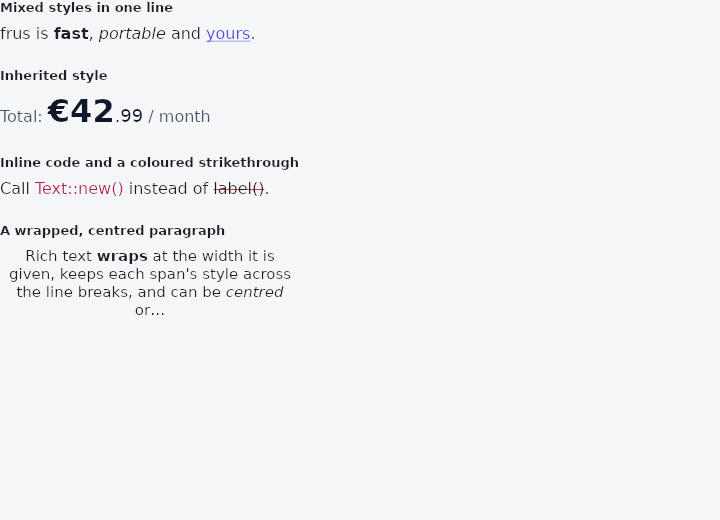
From frus-examples/widgets/src/features/text/widgets/rich_text.rs:
//! `RichText` and `TextSpan` — one paragraph in several styles: a bold word, a link-
//! coloured phrase, a price in two sizes.
//!
//! A `TextSpan` is a tree: each span has its own text and children, and a child
//! inherits whatever its parent's style says unless it says otherwise.

use frus::{
    Color, Container, FontFamily, FontWeight, RichText, TextAlign, TextDecoration, TextOverflow,
    TextSpan, TextStyle, Widget,
};

use crate::common::shared::{section, sections};

pub fn example() -> Box<dyn Widget> {
    sections(vec![
        // The basics: plain text, then children that change one thing each.
        Box::new(section(
            "Mixed styles in one line",
            RichText::new(
                TextSpan::new("frus is ")
                    .child(TextSpan::new("fast").bold())
                    .child(TextSpan::new(", "))
                    .child(TextSpan::new("portable").italic())
                    .child(TextSpan::new(" and "))
                    .child(
                        TextSpan::new("yours")
                            .underline()
                            .color(Color::hex("#4F46E5")),
                    )
                    .child(TextSpan::new(".")),
            ),
        )),
        // Inheritance: the outer span sets size and colour once; the children only say
        // what differs.
        Box::new(section(
            "Inherited style",
            RichText::new(
                TextSpan::new("Total: ")
                    .style(TextStyle::new(16.0).color(Color::hex("#475569")))
                    .child(
                        TextSpan::new("€42")
                            .size(32.0)
                            .weight(FontWeight::Bold)
                            .color(Color::hex("#0F172A")),
                    )
                    .child(TextSpan::new(".99").size(18.0).color(Color::hex("#0F172A")))
                    .child(TextSpan::new(" / month")),
            ),
        )),
        // A whole span can carry a full `TextStyle` — here monospace for inline code —
        // and a decoration in a colour of its own.
        Box::new(section(
            "Inline code and a coloured strikethrough",
            RichText::new(
                TextSpan::new("Call ")
                    .child(
                        TextSpan::new("Text::new()")
                            .style(TextStyle::NONE.family(FontFamily::Monospace))
                            .color(Color::hex("#BE185D")),
                    )
                    .child(TextSpan::new(" instead of "))
                    .child(
                        TextSpan::new("label()")
                            .decoration(TextDecoration::STRIKETHROUGH)
                            .decoration_color(Color::hex("#DC2626")),
                    )
                    .child(TextSpan::new(".")),
            ),
        )),
        // A paragraph wraps, aligns and truncates like a `Text` does; the base style is
        // what every span starts from.
        Box::new(section(
            "A wrapped, centred paragraph",
            Container::new().width(300.0).child(
                RichText::new(
                    TextSpan::new("Rich text ")
                        .child(TextSpan::new("wraps").bold())
                        .child(TextSpan::new(
                            " at the width it is given, keeps each span's style across the \
                             line breaks, and can be ",
                        ))
                        .child(TextSpan::new("centred").italic())
                        .child(TextSpan::new(" or cut short after a number of lines.")),
                )
                .base_style(TextStyle::new(15.0).height(1.4))
                .align(TextAlign::Center)
                .max_lines(3)
                .overflow(TextOverflow::Ellipsis),
            ),
        )),
    ])
}
Properties
| Type | Method | Argument | Effect |
|---|---|---|---|
RichText | .base_style() | style: TextStyle | Overrides the base style (the root of the cascade) — typically one step of the theme's scale (.base_style(theme.text.body_large)). |
RichText | .wrap() | — | Wraps at the width the parent offers. This is the default; the call is kept because saying so at the call site is not redundant when it is the point. |
RichText | .no_wrap() | — | Keeps the runs on one line, explicit newlines aside. |
RichText | .align() | align: TextAlign | Where the lines sit inside the box the paragraph was given. As with crate::Text, it does nothing to a paragraph that shrink-wraps — and makes the paragraph take the width it is offered, so that there is something to sit in. |
RichText | .max_lines() | max_lines: usize | At most max_lines lines; the rest is dropped and RichText::overflow decides how the last one ends. Saying so also tells the layout this paragraph may be given less than it asked for. |
RichText | .overflow() | overflow: TextOverflow | What becomes of runs that do not fit: cut, cut with an ellipsis, faded out, or drawn past the box. |
TextSpan | .bold() | — | Makes this subtree bold. |
TextSpan | .weight() | weight: FontWeight | Sets this subtree's weight. |
TextSpan | .italic() | — | Makes this subtree italic. |
TextSpan | .size() | size: f32 | Sets this subtree's size. |
TextSpan | .color() | color: Color | Sets this subtree's colour. |
TextSpan | .underline() | — | Underlines this subtree. It combines with the decoration already set on this node, but not with the parent's. |
TextSpan | .strikethrough() | — | Strikes through this subtree. |
TextSpan | .decoration() | decoration: TextDecoration | Sets this subtree's decoration lines. |
TextSpan | .decoration_color() | color: Color | Sets this subtree's decoration colour. |
TextSpan | .style() | style: TextStyle | Applies a whole TextStyle as this subtree's override, replacing whatever this span had said before. |
TextSpan | .child() | child: TextSpan | Adds a child, rendered after this node's own text. |
Behaviour
RichText
A rich text paragraph. It wraps at the width it is offered, as crate::Text does and for the same reason: a piece of prose in a box narrower than itself is a paragraph.
Everything milestones 343 and 344 gave Text is here — RichText::align, RichText::max_lines, RichText::overflow, RichText::no_wrap — because the three questions they answer are questions about text, and the styles being mixed changes none of them.
TextSpan
A rich-text tree: each node carries a fragment of text, partial style overrides — whatever is unspecified inherits from the parent, so a .bold() child keeps its parent's size — and children of its own.
let span = TextSpan::new("Hello ")
    .child(TextSpan::new("bold").bold())
    .child(TextSpan::new(" world"));
let runs = span.flatten(TextStyle::new(20.0));
assert_eq!(runs.len(), 3);
assert_eq!(runs[1].1.size, 20.0); // the bold child inherits the size
See also
- Text: a run of text: size, weight, colour, decoration, alignment, wrapping, line limits.
- TextStyle & DefaultTextStyle: a style as a value: shared, merged, or given to a whole subtree.
- Text theme: the app's type scale, from display_large to label_small, and headings.
- FontFamily: sans-serif, serif, monospace, or a font registered by name.
- Selectable text & SelectionArea: text the reader can select and copy, alone or across several texts.
- The guide: Text, colour and the theme
- API reference:
RichText - API reference:
TextSpan
Source: crates/frus-widgets/src/richtext.rs, crates/frus-core/src/text_style.rs @ e6fba33f5b42