keyed and Keyed
Purpose
A stable identity, so a widget's state follows it when siblings move.
Signature
pub fn keyed<Msg>(key: impl Hash, widget: impl Widget<Msg> + 'static) -> Keyed<Msg>
pub struct Keyed<Msg = crate::callback::Callback> { .. }

impl Keyed {
    pub fn new(key: impl Hash, inner: impl Widget<Msg> + 'static) -> Self;
    pub fn wrap(index: usize, inner: impl Widget<Msg> + 'static) -> Self;
}
Example
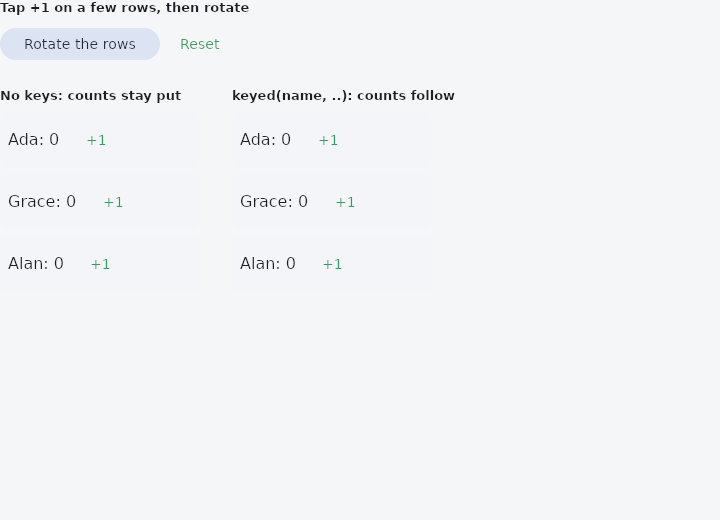
From frus-examples/widgets/src/features/state/widgets/keyed.rs:
//! `keyed` / `Keyed` — give a widget a stable identity, so its state follows it when its
//! siblings move.
//!
//! Without a key, a state belongs to a **position** among siblings: rotate a list and each
//! row keeps the count of whatever row used to be there. With `keyed(id, row)` the state
//! belongs to the id. Key every row of a list that can reorder, insert or remove.

use frus::{
    component, keyed, Align, Button, Column, Component, Container, Row, Text, Variant, Widget, Wrap,
};

use crate::common::shared::{section, sections};

const NAMES: [&str; 3] = ["Ada", "Grace", "Alan"];

pub fn example() -> Box<dyn Widget> {
    Box::new(component(|cx| {
        let order = cx.use_state(|| NAMES.to_vec());

        let (rotate, reset) = (order.clone(), order.clone());
        let controls = Row::new()
            .spacing(8.0)
            .child(
                Button::new("Rotate the rows")
                    .variant(Variant::Tonal)
                    .on_press(move || rotate.update(|names| names.rotate_left(1))),
            )
            .child(
                Button::new("Reset")
                    .variant(Variant::Text)
                    .on_press(move || reset.set(NAMES.to_vec())),
            );

        let names = order.get();
        // Each row keeps its own count with `use_state`.
        let unkeyed = names.iter().fold(
            Column::new()
                .spacing(6.0)
                .cross_axis_alignment(Align::Start),
            |column, name| column.child(row(name)),
        );
        let with_keys = names.iter().fold(
            Column::new()
                .spacing(6.0)
                .cross_axis_alignment(Align::Start),
            |column, name| column.child(keyed(*name, row(name))),
        );

        sections(vec![
            Box::new(section("Tap +1 on a few rows, then rotate", controls)),
            Box::new(
                Wrap::new()
                    .gap(32.0)
                    .run_gap(24.0)
                    .child(section("No keys: counts stay put", unkeyed))
                    .child(section("keyed(name, ..): counts follow", with_keys)),
            ),
        ])
    }))
}

/// A row with a count of its own.
fn row(name: &'static str) -> Component {
    component(move |cx| {
        let count = cx.use_state(|| 0_u32);
        let scheme = &cx.theme().scheme;
        let add = count.clone();
        Box::new(
            Container::new()
                .width(200.0)
                .padding(8.0)
                .radius(8.0)
                .color(scheme.surface_container)
                .child(
                    Row::new()
                        .spacing(8.0)
                        .cross_axis_alignment(Align::Center)
                        .child(Text::new(format!("{name}: {}", count.get())))
                        .child(
                            Button::new("+1")
                                .variant(Variant::Text)
                                .on_press(move || add.update(|n| *n += 1)),
                        ),
                ),
        )
    })
}
Properties
No builder methods: everything is set through the constructor.
Behaviour
keyed
Shorthand: gives a widget — a list item, say — a stable identity. keyed(todo.id, todo_row(todo)) is Keyed::new(todo.id, todo_row(todo)).
Keyed
Wraps a widget in a stable identity key, delegating everything else.
See also
- use_stream & StreamBuilder: work that gives several values as it goes, then finishes.
- host::spawn & host::after: slow work on another thread, and something to do after a delay.
- Theme: reading the theme's colours and type, and switching light and dark.
- Themed & ThemeBuilder: a different theme, or part of one, for one part of the screen.
- MediaQuery & MediaScope: the screen's size, insets, text scale, brightness and size class.
- The guide: Starting a frus application
- API reference:
keyed - API reference:
Keyed
Source: crates/frus-widgets/src/dsl.rs, crates/frus-widgets/src/keyed.rs @ e6fba33f5b42