ScrollBehavior
Purpose
Edge physics, scrollbars and overscroll, per scrollable or per subtree.
Signature
pub struct ScrollBehavior { .. }

impl ScrollBehavior {
    pub const fn new() -> Self;
    pub const fn material() -> Self;
}
Example
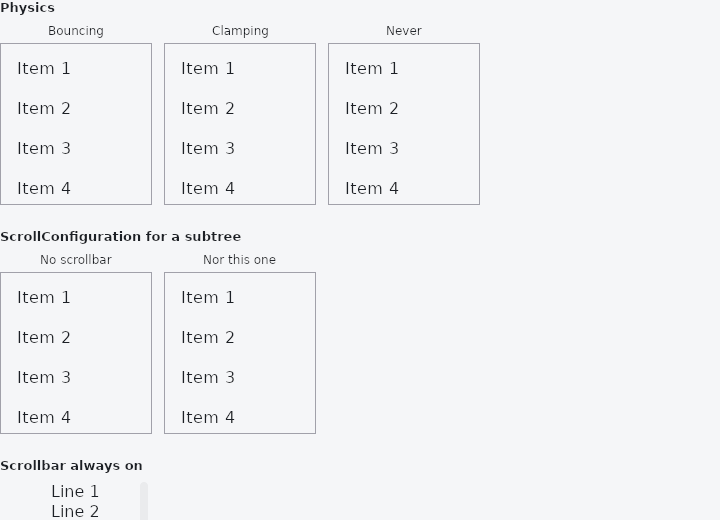
From frus-examples/widgets/src/features/scrolling/widgets/scrollbehavior.rs:
//! Scroll behaviour — how scrollables feel at their edges and whether they show
//! scrollbars. The app's default follows the platform; `ScrollConfiguration` changes it
//! for a subtree, and each scrollable can override its own physics and scrollbar.

use frus::{
    Color, Column, Container, ListTile, ListView, Row, ScrollConfiguration, ScrollPhysics,
    Scrollbars, Text, Widget, Wrap,
};

use crate::common::shared::{section, sections};

pub fn example() -> Box<dyn Widget> {
    sections(vec![
        // Per scrollable: the physics at the edges. Bouncing goes past the edge and
        // springs back; clamping stops dead; `NEVER` does not let the user scroll at all
        // (programmatic scrolling still works).
        Box::new(section(
            "Physics",
            Wrap::new()
                .gap(12.0)
                .run_gap(12.0)
                .child(labelled(
                    "Bouncing",
                    list().physics(ScrollPhysics::BOUNCING),
                ))
                .child(labelled(
                    "Clamping",
                    list().physics(ScrollPhysics::CLAMPING),
                ))
                .child(labelled("Never", list().physics(ScrollPhysics::NEVER))),
        )),
        // For a whole subtree: take the behaviour in force and change one thing. Here,
        // no scrollbars and no overscroll indicator for everything inside.
        Box::new(section(
            "ScrollConfiguration for a subtree",
            ScrollConfiguration::new(
                ScrollConfiguration::of()
                    .with_scrollbars(false)
                    .with_overscroll(false),
                Row::new()
                    .spacing(12.0)
                    .main_axis_size(frus::MainAxisSize::Min)
                    .child(labelled("No scrollbar", list()))
                    .child(labelled("Nor this one", list())),
            ),
        )),
        // A single scroll view can insist on a scrollbar where the platform shows none
        // (on a touch screen, say) and keep it visible.
        Box::new(section(
            "Scrollbar always on",
            frus::SingleChildScrollView::new()
                .scrollbars(Scrollbars::Always)
                .thumb_visibility(true)
                .width(150.0)
                .height(160.0)
                .child((1..=20).fold(Column::new(), |column, i| {
                    column.child(Text::new(format!("Line {i}")))
                })),
        )),
    ])
}

/// A short list to try the behaviours on.
fn list() -> ListView {
    ListView::new(30, 40.0, |i| {
        ListTile::new().dense().title(format!("Item {}", i + 1))
    })
    .width(150.0)
    .height(160.0)
}

fn labelled(label: &str, list: impl Widget + 'static) -> Column {
    Column::new()
        .spacing(4.0)
        .main_axis_size(frus::MainAxisSize::Min)
        .child(Text::new(label).size(12.0))
        .child(
            Container::new()
                .border(1.0, Color::hex("#A1A1AA"))
                .child(list),
        )
}
Properties
| Method | Argument | Effect |
|---|---|---|
.with_scrollbars() | scrollbars: bool | The same behaviour, with its scrollbars on or off. Off, none is drawn on any platform; on, the platform decides. |
.with_overscroll() | overscroll: bool | The same behaviour, with its overscroll indicator on or off. Off, nothing is shown past an edge on any platform; on, the platform decides. |
.with_physics() | physics: ScrollPhysics | The same behaviour, with these physics on every platform. |
.with_platform() | platform: TargetPlatform | The same behaviour, following platform instead of the one it would have followed. |
Behaviour
How the scrollables under it behave, from the platform it follows.
| physics | scrollbars | overscroll | fling | |
|---|---|---|---|---|
| Android | clamping | none | stretch (base: glow) | regression |
| Fuchsia | clamping | none | glow | regression |
| iOS | bouncing | none | none | recent average |
| macOS | bouncing, fast | shown | none | recent average, desktop |
| Linux, Windows | clamping | shown | none | regression |
See also
- Programmatic scrolling: read where a list is with on_scroll, and move it with scroll_to.
- ScrollOverlay: something drawn over a scroll region, rebuilt from its offset.
- The guide: Lists and grids
- API reference:
ScrollBehavior
Source: crates/frus-widgets/src/scrollbehavior.rs @ e6fba33f5b42