Kanban
Purpose
A board of columns and cards, with drag and drop between columns.
Signature
pub struct Kanban<Msg = crate::callback::Callback> { .. }

impl Kanban {
    pub fn new<R: crate::callback::IntoMsg<Msg>>(
        on_move: impl Fn(usize, usize, usize, usize) -> R + 'static,
    ) -> Self;
}
Example
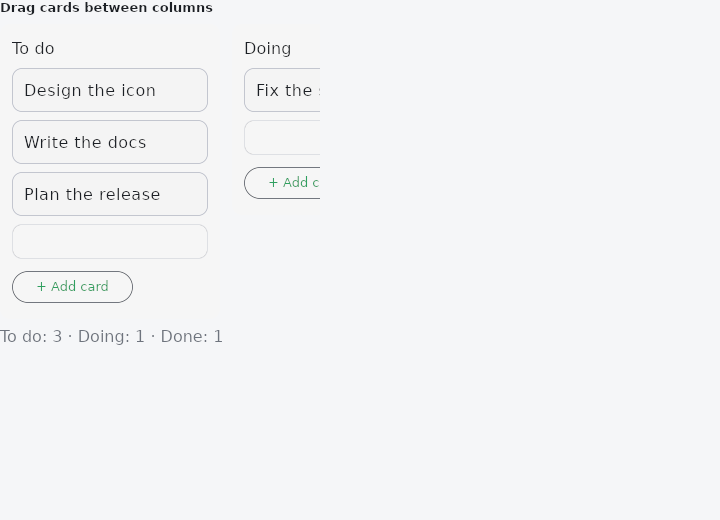
From frus-examples/widgets/src/features/scrolling/widgets/kanban.rs:
//! `Kanban` — a board of columns and cards, with drag and drop between columns. The
//! board is controlled: the app holds the cards and moves one when a drop is reported.

use frus::{Align, Axis, Column, Container, Kanban, SingleChildScrollView, Text, Widget};

use crate::common::shared::{section, sections};

pub fn example() -> Box<dyn Widget> {
    Box::new(frus::component(|cx| {
        let board = cx.use_state(|| {
            vec![
                (
                    "To do",
                    vec!["Design the icon", "Write the docs", "Plan the release"],
                ),
                ("Doing", vec!["Fix the scroll bug"]),
                ("Done", vec!["Set up CI"]),
            ]
            .into_iter()
            .map(|(title, cards)| {
                (
                    title.to_string(),
                    cards.into_iter().map(String::from).collect(),
                )
            })
            .collect::<Vec<(String, Vec<String>)>>()
        });

        // `on_move(from_col, from_pos, to_col, to_pos)` fires on a drop; `on_add(col)`
        // when a column's "+ Add card" is pressed. Both just change the app's lists.
        let (moved, added) = (board.clone(), board.clone());
        let kanban = board.get().into_iter().fold(
            Kanban::new(
                move |from_col: usize, from_pos: usize, to_col: usize, to_pos: usize| {
                    moved.update(|columns| {
                        move_card(columns, (from_col, from_pos), (to_col, to_pos))
                    })
                },
            )
            .on_add(move |col: usize| {
                added.update(|columns| {
                    let n = columns[col].1.len() + 1;
                    columns[col].1.push(format!("New card {n}"));
                })
            }),
            |kanban, (title, cards)| kanban.column(title, cards),
        );

        let counts: Vec<String> = board
            .get()
            .iter()
            .map(|(title, cards)| format!("{title}: {}", cards.len()))
            .collect();

        // A board is wider than a phone: let it scroll sideways.
        sections(vec![Box::new(section(
            "Drag cards between columns",
            Column::new()
                .spacing(8.0)
                .cross_axis_alignment(Align::Start)
                .child(
                    SingleChildScrollView::new()
                        .axis(Axis::Horizontal)
                        .width(320.0)
                        .child(Container::new().width(700.0).child(kanban)),
                )
                .child(Text::new(counts.join(" · ")).color(cx.theme().muted)),
        ))])
    }))
}

/// Takes the card at `from` and inserts it at `to` (positions within columns).
pub fn move_card(columns: &mut [(String, Vec<String>)], from: (usize, usize), to: (usize, usize)) {
    let Some(card) = columns
        .get_mut(from.0)
        .filter(|(_, cards)| from.1 < cards.len())
        .map(|(_, cards)| cards.remove(from.1))
    else {
        return;
    };
    if let Some((_, cards)) = columns.get_mut(to.0) {
        // Within one column the removal shifted everything after it up by one.
        let at = if from.0 == to.0 && to.1 > from.1 {
            to.1 - 1
        } else {
            to.1
        };
        cards.insert(at.min(cards.len()), card);
    }
}
Properties
| Method | Argument | Effect |
|---|---|---|
.card_text_style() | style: TextStyle | The text cards' type, over the theme's and the framework's. |
.column_title_text_style() | style: TextStyle | The column headings' type, over the theme's and the framework's. |
.column() | title: impl Into<String>, cards: impl IntoIterator<Item = impl Into<String>> | Adds a titled column with its (text) cards, in order. |
.column_widgets() | title: impl Into<String>, cards: impl IntoIterator<Item = CellFn<Msg>> | Adds a column in which every card is a widget (a rich card: a label + tags + a delete button…), supplied by a factory called again on every rebuild. The card stays a drag and drop source and target; its clickable elements (a × button…) capture their own click. |
.on_add() | on_add: impl Fn(usize) -> R + 'static | Adds a "+ Add card" button at the bottom of every column; on_add(col) on click (the app adds a card to the column). Without this call, there is no add button. |
.card_area_height() | h: f32 | Makes each column's cards scroll vertically within a region of height h (in logical pixels), Trello style: the title stays fixed above, the "+ Add card" button fixed below, and only the cards (with the final drop zone) scroll. Without this call, the column stretches to the height of its content. |
.scrollable_columns() | — | Per-column vertical scrolling Trello style, with no explicit height (milestone 266): the columns fill the board's height and each column's card area takes the rest (below the title, above the "+ Add card" button) and then scrolls. Unlike Kanban::card_area_height, the app has no height to compute: the board sits in an ancestor of definite height (a window, a bounded horizontal SingleChildScrollView…) and the flex fill does the rest. Takes precedence over card_area_height when both are set. |
Behaviour
A board of columns holding cards, which can be dragged from one column to another or reordered inside one.
It is controlled: the application holds the columns and their cards, and the board only says where a card was dropped, through the callback given to Kanban::new.
See also
- StickyHeader: section headers that stay at the top while their section is in view.
- ListWheel: a spinning cylinder of values to pick one from.
- RefreshIndicator: pull a list down past its top to refresh it.
- Programmatic scrolling: read where a list is with on_scroll, and move it with scroll_to.
- ScrollOverlay: something drawn over a scroll region, rebuilt from its offset.
- The guide: Lists and grids
- API reference:
Kanban
Source: crates/frus-widgets/src/kanban.rs @ e6fba33f5b42