Opacity
Purpose
Paints a child partly transparent, as one layer.
Signature
pub struct Opacity<Msg = crate::callback::Callback> { .. }

impl Opacity {
    pub fn new(opacity: f32, child: impl Widget<Msg> + 'static) -> Self;
}
Example
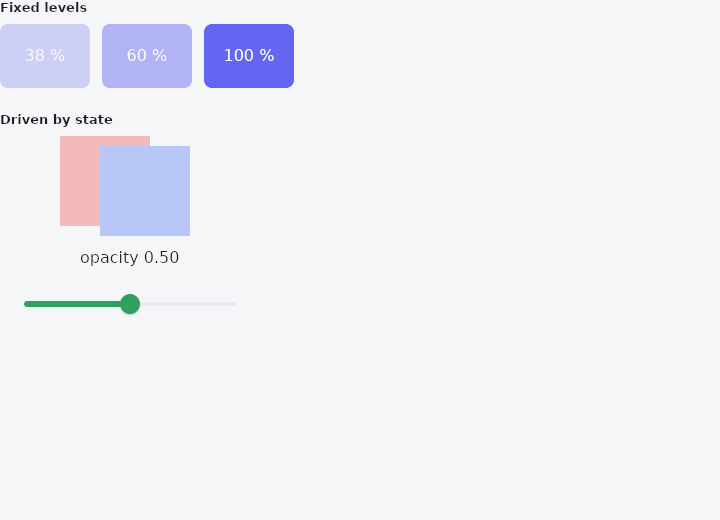
From frus-examples/widgets/src/features/painting/widgets/opacity.rs:
//! `Opacity` — paints a child partly transparent, the whole subtree as one layer.
//!
//! To fade something in or out over time, use `AnimatedOpacity` (Animation category);
//! `Opacity` is for a fixed or state-driven amount.

use frus::{
    component, Alignment, Color, Column, Container, Opacity, Positioned, Slider, Stack, Text,
    Widget, Wrap,
};

use crate::common::shared::{section, sections};

pub fn example() -> Box<dyn Widget> {
    sections(vec![
        // The usual fixed levels: a disabled-looking 38 %, a secondary 60 %, full.
        Box::new(section(
            "Fixed levels",
            Wrap::new()
                .gap(12.0)
                .run_gap(12.0)
                .child(Opacity::new(0.38, tile("38 %")))
                .child(Opacity::new(0.6, tile("60 %")))
                .child(Opacity::new(1.0, tile("100 %"))),
        )),
        // Live: the slider's value is the opacity. The overlapping squares fade as one
        // picture — you never see the lower one through the upper.
        Box::new(section("Driven by state", live())),
    ])
}

fn live() -> impl Widget {
    component(|cx| {
        let opacity = cx.use_state(|| 0.5_f32);
        let value = opacity.get();
        Box::new(
            Column::new()
                .spacing(12.0)
                .child(Opacity::new(
                    value,
                    Stack::new()
                        .width(140.0)
                        .height(100.0)
                        .layer(
                            Container::new()
                                .width(90.0)
                                .height(90.0)
                                .color(Color::hex("#EF4444")),
                        )
                        .layer(
                            Positioned::new(
                                Container::new()
                                    .width(90.0)
                                    .height(90.0)
                                    .color(Color::hex("#3B82F6")),
                            )
                            .left(40.0)
                            .top(10.0),
                        ),
                ))
                .child(Text::new(format!("opacity {value:.2}")))
                .child(
                    Slider::new(value)
                        .width(260.0)
                        .on_change(move |v| opacity.set(v)),
                ),
        )
    })
}

fn tile(label: &str) -> Container {
    Container::new()
        .width(90.0)
        .height(64.0)
        .radius(8.0)
        .color(Color::hex("#6366F1"))
        .alignment(Alignment::CENTER)
        .child(Text::new(label).color(Color::hex("#FFFFFF")))
}
Properties
No builder methods: everything is set through the constructor.
Behaviour
Applies a fixed group opacity [0,1] to its child, as one block. See Container::opacity.
See also
- ClipRect, ClipRRect, ClipOval & ClipPath: cuts a child's painting to a rectangle, rounded corners, an oval or any path.
- Transform & FractionalTranslation: moves, scales or rotates a child's painting without changing the layout.
- CustomPaint: a canvas you draw yourself, with paths, rectangles and the theme's colours.
- ShaderMask: lays a gradient over a child's pixels: gradient text, fades, spotlights.
- ColorFiltered: changes the colours of everything a child paints.
- The guide: Text, colour and the theme
- API reference:
Opacity
Source: crates/frus-widgets/src/animated.rs @ e6fba33f5b42