Gradient
Purpose
Linear, radial and sweep gradients, painted by a BoxDecoration.
Signature
pub enum Gradient {
    /// Along a line.
    Linear(LinearGradient),
    /// Round a centre.
    Radial(RadialGradient),
    /// Turning round a centre.
    Sweep(SweepGradient),
}
Example
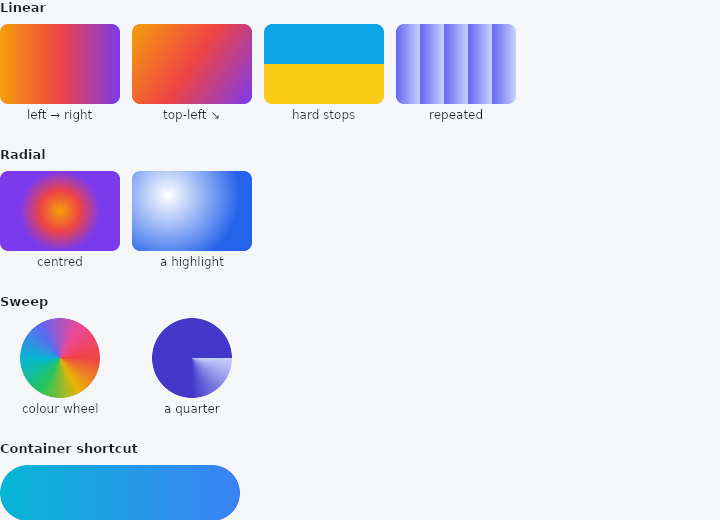
From frus-examples/widgets/src/features/painting/widgets/gradients.rs:
//! Gradients — `LinearGradient`, `RadialGradient` and `SweepGradient`, painted by a
//! `BoxDecoration` (on a `Container` or a `DecoratedBox`).
//!
//! The three are plain structs: start from `new(colors)` and change the public fields
//! you need — stops, tile mode, centre, angles — with struct update syntax.

use frus::{
    Alignment, BoxDecoration, BoxShape, Color, Column, Container, Gradient, LinearGradient,
    RadialGradient, SweepGradient, Text, TileMode, Widget, Wrap,
};

use crate::common::shared::{section, sections};

pub fn example() -> Box<dyn Widget> {
    let sunset = || {
        vec![
            Color::hex("#F59E0B"),
            Color::hex("#EF4444"),
            Color::hex("#7C3AED"),
        ]
    };

    sections(vec![
        // Left to right by default; `between` sets where the first and last colours are.
        Box::new(section(
            "Linear",
            Wrap::new()
                .gap(12.0)
                .run_gap(12.0)
                .child(swatch("left → right", LinearGradient::new(sunset())))
                .child(swatch(
                    "top-left ↘",
                    LinearGradient::new(sunset())
                        .between(Alignment::TOP_LEFT, Alignment::BOTTOM_RIGHT),
                ))
                // Stops place each colour: here a hard edge halfway, as a flag would have.
                .child(swatch(
                    "hard stops",
                    LinearGradient {
                        stops: Some(vec![0.0, 0.5, 0.5, 1.0]),
                        ..LinearGradient::new(vec![
                            Color::hex("#0EA5E9"),
                            Color::hex("#0EA5E9"),
                            Color::hex("#FACC15"),
                            Color::hex("#FACC15"),
                        ])
                        .between(Alignment::TOP_CENTER, Alignment::BOTTOM_CENTER)
                    },
                ))
                // The tile mode decides what lies past the ends: repeated stripes here.
                .child(swatch(
                    "repeated",
                    LinearGradient {
                        tile_mode: TileMode::Repeated,
                        ..LinearGradient::new(vec![Color::hex("#6366F1"), Color::hex("#C7D2FE")])
                            .between(Alignment::new(-1.0, 0.0), Alignment::new(-0.6, 0.0))
                    },
                )),
        )),
        // From a centre outwards; `radius` is a fraction of the box's shorter side.
        Box::new(section(
            "Radial",
            Wrap::new()
                .gap(12.0)
                .run_gap(12.0)
                .child(swatch("centred", RadialGradient::new(sunset())))
                .child(swatch(
                    "a highlight",
                    RadialGradient {
                        center: Alignment::new(-0.4, -0.4).into(),
                        radius: 0.9,
                        ..RadialGradient::new(vec![Color::hex("#FFFFFF"), Color::hex("#2563EB")])
                    },
                )),
        )),
        // Round a centre, by angle: colour wheels, progress rings, dials.
        Box::new(section(
            "Sweep",
            Wrap::new()
                .gap(12.0)
                .run_gap(12.0)
                .child(round_swatch(
                    "colour wheel",
                    SweepGradient::new(vec![
                        Color::hex("#EF4444"),
                        Color::hex("#EAB308"),
                        Color::hex("#22C55E"),
                        Color::hex("#06B6D4"),
                        Color::hex("#6366F1"),
                        Color::hex("#EC4899"),
                        Color::hex("#EF4444"),
                    ]),
                ))
                .child(round_swatch(
                    "a quarter",
                    SweepGradient {
                        end_angle: std::f32::consts::FRAC_PI_2,
                        ..SweepGradient::new(vec![Color::hex("#C7D2FE"), Color::hex("#4338CA")])
                    },
                )),
        )),
        // `Container::gradient` is the shortcut for a two-colour linear one: from the
        // container's colour to `end`, along a direction.
        Box::new(section(
            "Container shortcut",
            Container::new()
                .width(240.0)
                .height(56.0)
                .radius(28.0)
                .color(Color::hex("#06B6D4"))
                .gradient(Color::hex("#3B82F6"), [1.0, 0.0]),
        )),
    ])
}

fn swatch(label: &str, gradient: impl Into<Gradient>) -> Column {
    labelled(
        label,
        BoxDecoration::default().radius(8.0).gradient(gradient),
    )
}

fn round_swatch(label: &str, gradient: impl Into<Gradient>) -> Column {
    labelled(
        label,
        BoxDecoration::default()
            .shape(BoxShape::Circle)
            .gradient(gradient),
    )
}

fn labelled(label: &str, decoration: BoxDecoration) -> Column {
    Column::new()
        .spacing(4.0)
        .child(
            Container::new()
                .width(120.0)
                .height(80.0)
                .decoration(decoration),
        )
        .child(Text::new(label).size(12.0))
}
Properties
No builder methods: everything is set through the constructor.
Behaviour
Any of the three.
See also
- DecoratedBox & ColoredBox: paints a fill, rounded corners, borders and shadows behind or in front of a child.
- Elevation & shadows: the shadows a surface casts at a given height, and shadow blur styles.
- ClipRect, ClipRRect, ClipOval & ClipPath: cuts a child's painting to a rectangle, rounded corners, an oval or any path.
- Transform & FractionalTranslation: moves, scales or rotates a child's painting without changing the layout.
- The guide: Text, colour and the theme
- API reference:
Gradient
Source: crates/frus-core/src/gradient.rs @ e6fba33f5b42