DecoratedBox and ColoredBox
Purpose
Paints a fill, rounded corners, borders and shadows behind or in front of a child.
Signature
pub struct DecoratedBox<Msg = crate::callback::Callback> { .. }

impl DecoratedBox {
    pub fn new(decoration: BoxDecoration, child: impl Widget<Msg> + 'static) -> Self;
    pub fn foreground(decoration: BoxDecoration, child: impl Widget<Msg> + 'static) -> Self;
}
pub struct ColoredBox<Msg = crate::callback::Callback> { .. }

impl ColoredBox {
    pub fn new(color: Color, child: impl Widget<Msg> + 'static) -> Self;
}
Example
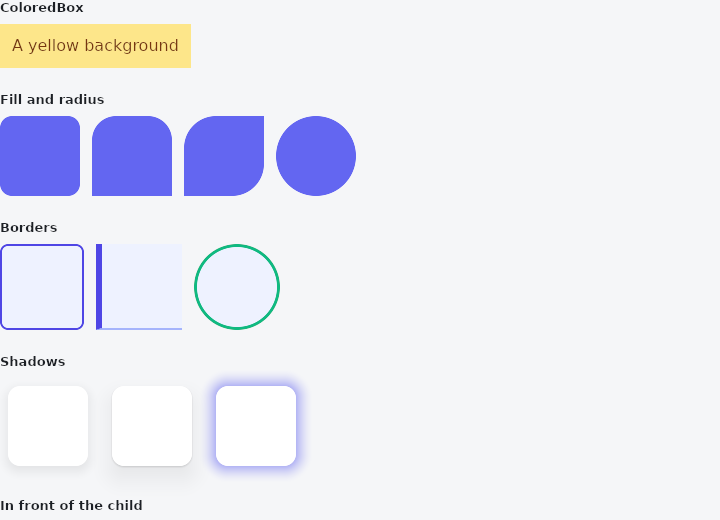
From frus-examples/widgets/src/features/painting/widgets/decorated_box.rs:
//! `DecoratedBox`, `ColoredBox` and `BoxDecoration` — paint a box behind (or in front
//! of) a child: a fill, rounded corners, a border, shadows, a circle.
//!
//! `Container` does all of this too, along with sizing and padding. These widgets say
//! one thing each, and `BoxDecoration` is the value they share — the thing a theme or
//! a design system hands you.

use frus::{
    Border, BorderRadius, BorderSide, BoxDecoration, BoxShadow, BoxShape, Color, ColoredBox,
    DecoratedBox, Padding, SizedBox, Text, Widget, Wrap,
};

use crate::common::shared::{section, sections};

pub fn example() -> Box<dyn Widget> {
    sections(vec![
        // The plainest box: one colour behind the child, nothing else.
        Box::new(section(
            "ColoredBox",
            ColoredBox::new(
                Color::hex("#FDE68A"),
                Padding::new(
                    12.0,
                    Text::new("A yellow background").color(Color::hex("#78350F")),
                ),
            ),
        )),
        // A fill and a radius, uniform or per corner.
        Box::new(section(
            "Fill and radius",
            Wrap::new()
                .gap(12.0)
                .run_gap(12.0)
                .child(tile(
                    BoxDecoration::filled(Color::hex("#6366F1")).radius(12.0),
                ))
                .child(tile(
                    BoxDecoration::filled(Color::hex("#6366F1")).radius(BorderRadius::top(24.0)),
                ))
                .child(tile(BoxDecoration::filled(Color::hex("#6366F1")).radius(
                    BorderRadius {
                        top_left: 32.0,
                        bottom_right: 32.0,
                        ..BorderRadius::ZERO
                    },
                )))
                .child(tile(
                    BoxDecoration::filled(Color::hex("#6366F1")).shape(BoxShape::Circle),
                )),
        )),
        // Borders: the same on every side, or each side its own width and colour.
        Box::new(section(
            "Borders",
            Wrap::new()
                .gap(12.0)
                .run_gap(12.0)
                .child(tile(
                    BoxDecoration::filled(Color::hex("#EEF2FF"))
                        .radius(8.0)
                        .border(Border::new(2.0, Color::hex("#4F46E5"))),
                ))
                .child(tile(BoxDecoration::filled(Color::hex("#EEF2FF")).border(
                    Border {
                        left: BorderSide::new(Color::hex("#4F46E5"), 6.0),
                        bottom: BorderSide::new(Color::hex("#A5B4FC"), 2.0),
                        ..Border::NONE
                    },
                )))
                .child(tile(
                    BoxDecoration::filled(Color::hex("#EEF2FF"))
                        .shape(BoxShape::Circle)
                        .border(Border::new(3.0, Color::hex("#10B981"))),
                )),
        )),
        // Shadows are a list: a soft wide one and a tight one together read as depth.
        // `BoxShadow::new(dx, dy, blur, colour)`, and `spread` grows it.
        Box::new(section(
            "Shadows",
            Padding::new(
                8.0,
                Wrap::new()
                    .gap(24.0)
                    .run_gap(24.0)
                    .child(tile(
                        BoxDecoration::filled(Color::hex("#FFFFFF"))
                            .radius(12.0)
                            .shadow(BoxShadow::new(
                                0.0,
                                4.0,
                                12.0,
                                Color::rgba(0.0, 0.0, 0.0, 0.2),
                            )),
                    ))
                    .child(tile(
                        BoxDecoration::filled(Color::hex("#FFFFFF"))
                            .radius(12.0)
                            .shadows([
                                BoxShadow::new(0.0, 1.0, 2.0, Color::rgba(0.0, 0.0, 0.0, 0.3)),
                                BoxShadow::new(0.0, 12.0, 24.0, Color::rgba(0.0, 0.0, 0.0, 0.15)),
                            ]),
                    ))
                    .child(tile(
                        BoxDecoration::filled(Color::hex("#FFFFFF"))
                            .radius(12.0)
                            .shadow(
                                BoxShadow::new(0.0, 0.0, 16.0, Color::hex("#6366F1")).spread(2.0),
                            ),
                    )),
            ),
        )),
        // `DecoratedBox::foreground` paints over the child instead of behind it: a frame
        // or a tint over a picture, which a background would be hidden by.
        Box::new(section(
            "In front of the child",
            DecoratedBox::foreground(
                BoxDecoration::filled(Color::rgba(0.31, 0.27, 0.9, 0.25))
                    .radius(8.0)
                    .border(Border::new(2.0, Color::hex("#4F46E5"))),
                ColoredBox::new(
                    Color::hex("#F59E0B"),
                    SizedBox::new(Padding::new(
                        12.0,
                        Text::new("Tinted from the front").color(Color::hex("#FFFFFF")),
                    ))
                    .width(220.0),
                ),
            ),
        )),
    ])
}

/// An 80 × 80 box wearing `decoration`.
fn tile(decoration: BoxDecoration) -> DecoratedBox {
    // The decoration is as big as its child: here an empty 80 × 80 box.
    DecoratedBox::new(decoration, SizedBox::empty().width(80.0).height(80.0))
}
Properties
No builder methods: everything is set through the constructor.
Behaviour
DecoratedBox
Paints a decoration — a fill or a gradient, a border, corners, a shadow — behind its child, or in front of it.
use frus_core::{Border, BorderRadius, BoxDecoration, Color};
use frus_widgets::{DecoratedBox, Text};

let frame = BoxDecoration::default()
    .border(Border::new(1.0, Color::rgb(0.8, 0.8, 0.8)))
    .radius(BorderRadius::uniform(8.0));
let _framed: DecoratedBox<()> = DecoratedBox::new(frame, Text::new("Framed"));
ColoredBox
Paints its box in one colour behind its child — a Container with a colour and nothing else, for the tree that only wants a fill.
use frus_core::Color;
use frus_widgets::{ColoredBox, Text};

let _band: ColoredBox<()> = ColoredBox::new(Color::rgb(0.95, 0.95, 0.9), Text::new("Note"));
See also
- Gradients: linear, radial and sweep gradients, painted by a BoxDecoration.
- Elevation & shadows: the shadows a surface casts at a given height, and shadow blur styles.
- ClipRect, ClipRRect, ClipOval & ClipPath: cuts a child's painting to a rectangle, rounded corners, an oval or any path.
- The guide: Text, colour and the theme
- API reference:
DecoratedBox - API reference:
ColoredBox
Source: crates/frus-widgets/src/boxes.rs, crates/frus-widgets/src/boxes.rs @ e6fba33f5b42