BackdropFilter
Purpose
Blurs what is painted underneath: frosted glass.
Signature
pub struct BackdropFilter<Msg = crate::callback::Callback> { .. }

impl BackdropFilter {
    pub fn new(filter: ImageFilter) -> Self;
    pub fn blur(sigma: f32) -> Self;
}
Example
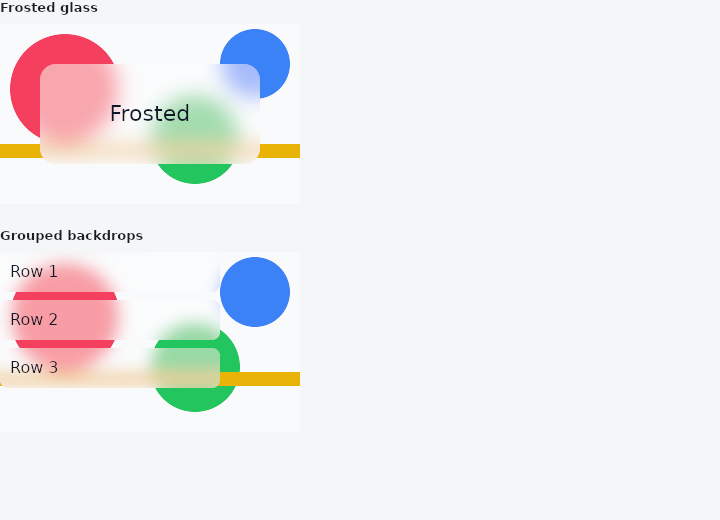
From frus-examples/widgets/src/features/painting/widgets/backdrop_filter.rs:
//! `BackdropFilter` and `BackdropGroup` — blur what is already painted *underneath* a
//! widget: the frosted glass a bar, a sheet or a dialog sits on.
//!
//! The blurred region is whatever clips the filter, not its own box — unclipped, the
//! whole window would blur. So a backdrop almost always sits inside a `ClipRRect` or a
//! `ClipRect`. It is the most expensive filter: when you mean "blur this widget", use
//! `ImageFiltered` instead.

use frus::{
    Alignment, BackdropFilter, BackdropGroup, ClipRRect, Color, Column, Container, Positioned,
    Stack, Text, Widget,
};

use crate::common::shared::{section, sections};

pub fn example() -> Box<dyn Widget> {
    sections(vec![
        // A translucent card over a busy background: the blur makes its text readable.
        Box::new(section(
            "Frosted glass",
            Stack::new()
                .width(300.0)
                .height(180.0)
                .layer(background())
                .layer(
                    Positioned::new(
                        ClipRRect::new(16.0).child(
                            BackdropFilter::blur(10.0).child(
                                Container::new()
                                    .padding(16.0)
                                    .color(Color::rgba(1.0, 1.0, 1.0, 0.35))
                                    .alignment(Alignment::CENTER)
                                    .child(
                                        Text::new("Frosted")
                                            .size(22.0)
                                            .color(Color::hex("#0F172A")),
                                    ),
                            ),
                        ),
                    )
                    .left(40.0)
                    .right(40.0)
                    .top(40.0)
                    .bottom(40.0),
                ),
        )),
        // Many backdrops in a list would each copy and blur the frame. Inside a
        // `BackdropGroup`, `grouped()` filters share one blur of what lies behind them.
        Box::new(section(
            "Grouped backdrops",
            Stack::new()
                .width(300.0)
                .height(180.0)
                .layer(background())
                .layer(Positioned::fill(BackdropGroup::new().child((1..=3).fold(
                    Column::new().spacing(8.0),
                    |column, i| {
                        column.child(
                            ClipRRect::new(8.0).child(
                                BackdropFilter::blur(8.0).grouped().child(
                                    Container::new()
                                        .width(220.0)
                                        .padding(10.0)
                                        .color(Color::rgba(1.0, 1.0, 1.0, 0.3))
                                        .child(
                                            Text::new(format!("Row {i}"))
                                                .color(Color::hex("#0F172A")),
                                        ),
                                ),
                            ),
                        )
                    },
                )))),
        )),
    ])
}

/// Something busy to blur: coloured circles and stripes.
fn background() -> Stack {
    Stack::new()
        .width(300.0)
        .height(180.0)
        .layer(
            Container::new()
                .width(300.0)
                .height(180.0)
                .color(Color::hex("#F8FAFC")),
        )
        .layer(
            Positioned::new(circle(110.0, "#F43F5E"))
                .left(10.0)
                .top(10.0),
        )
        .layer(
            Positioned::new(circle(90.0, "#22C55E"))
                .left(150.0)
                .top(70.0),
        )
        .layer(
            Positioned::new(circle(70.0, "#3B82F6"))
                .left(220.0)
                .top(5.0),
        )
        .layer(
            Positioned::new(
                Container::new()
                    .width(300.0)
                    .height(14.0)
                    .color(Color::hex("#EAB308")),
            )
            .left(0.0)
            .top(120.0),
        )
}

fn circle(size: f32, color: &str) -> Container {
    Container::new()
        .width(size)
        .height(size)
        .radius(size / 2.0)
        .color(Color::hex(color))
}
Properties
| Method | Argument | Effect |
|---|---|---|
.grouped() | — | Shares the filtered copy with every other grouped backdrop under the same BackdropGroup: they are filtered once between them. |
.key() | key: u64 | Shares the filtered copy with every other backdrop given the same key, without needing a group around them. |
.blend() | blend: BlendMode | How the filtered copy meets what it was copied from. The default paints it over, which is what an opaque frame wants; BlendMode::Src replaces instead, which is what a frame that is not opaque underneath wants. |
.child() | child: impl Widget<Msg> + 'static | Sets the child painted over the filtered backdrop. |
.enabled() | enabled: bool | Turns the backdrop off: the child is painted as if this widget were not there, and nothing is copied or filtered. |
Behaviour
Filters what is already painted underneath it, then paints its child over the result: the frosted glass a sheet, a bar or a dialog sits on.
The region is whatever clips this widget, not the widget's own box. Unclipped, that is the whole surface.
ClipRRect::new(28.0).child(
    BackdropFilter::blur(24.0).child(
        Container::new().height(72.0).color(theme.surface.fade(0.6)),
    ),
)
This is the expensive filter. ImageFiltered blurs the widget, from a texture the renderer was going to make anyway; a backdrop blurs the frame so far, so the renderer stops, copies what it has drawn, filters that, and carries on — once per backdrop. When the answer wanted is "blur this widget", the other one is both easier to reason about and dramatically cheaper.
A list of frosted rows is the case where that cost becomes a problem, and BackdropGroup with BackdropFilter::grouped is the answer: sixty rows, one blur.
See also
- ColorFiltered: changes the colours of everything a child paints.
- ImageFiltered: blurs a child, or grows and shrinks its shapes.
- The guide: Text, colour and the theme
- API reference:
BackdropFilter
Source: crates/frus-widgets/src/filters.rs @ e6fba33f5b42