SafeArea
Purpose
Keeps its child clear of status bars, notches, the gesture handle and the keyboard.
Signature
pub struct SafeArea<Msg = crate::callback::Callback> { .. }

impl SafeArea {
    pub fn new(child: impl Widget<Msg> + 'static) -> Self;
    pub fn build<W: Widget<Msg> + 'static>(build: impl FnOnce(MediaQuery) -> W) -> Self;
    pub fn build_with<W: Widget<Msg> + 'static>(
        edges: Edges,
        minimum: Insets,
        keyboard: bool,
        build: impl FnOnce(MediaQuery) -> W,
    ) -> Self;
}
Example
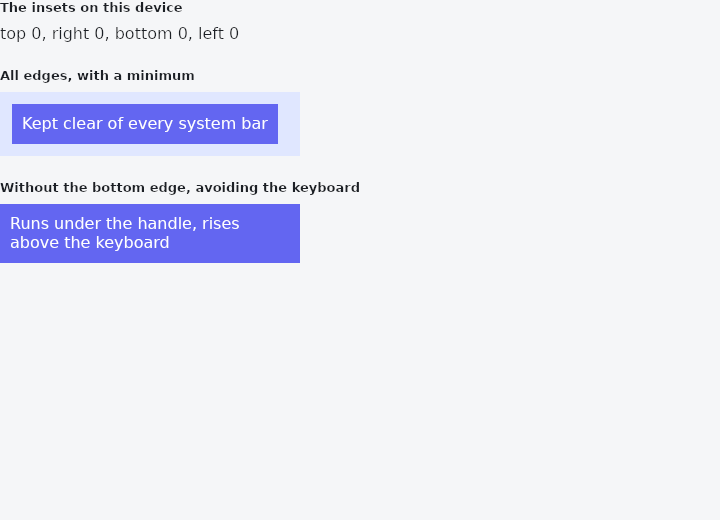
From frus-examples/widgets/src/features/layout/widgets/safe_area.rs:
//! `SafeArea` — keeps its child clear of the parts of the screen the system has taken:
//! the status bar, a notch or camera cut-out, the gesture handle, the keyboard.
//!
//! On desktop those insets are zero and `SafeArea` changes nothing, so the same screen
//! code is right everywhere. Wrap the body of a page that draws edge to edge in one.

use frus::{Color, Container, Edges, Insets, SafeArea, Text, Widget};

use crate::common::shared::{section, sections};

pub fn example() -> Box<dyn Widget> {
    sections(vec![
        // `build` hands you the screen's current metrics: here, the insets it is keeping
        // clear on this device. On a desktop window they are all zero.
        Box::new(section(
            "The insets on this device",
            SafeArea::build(|media| {
                let p = media.padding;
                Text::new(format!(
                    "top {:.0}, right {:.0}, bottom {:.0}, left {:.0}",
                    p.top, p.right, p.bottom, p.left
                ))
            }),
        )),
        // Every edge, plus a minimum padding of 12 px so the content never touches the
        // frame even where the system takes nothing.
        Box::new(section(
            "All edges, with a minimum",
            framed(
                SafeArea::new(content("Kept clear of every system bar"))
                    .minimum(Insets::uniform(12.0)),
            ),
        )),
        // A list that should run under the gesture handle drops the bottom edge; a form
        // adds `avoid_keyboard` to move up when the on-screen keyboard opens.
        Box::new(section(
            "Without the bottom edge, avoiding the keyboard",
            framed(
                SafeArea::new(content("Runs under the handle, rises above the keyboard"))
                    .edges(Edges::ALL.without_bottom())
                    .avoid_keyboard(),
            ),
        )),
    ])
}

fn framed(child: impl Widget + 'static) -> Container {
    Container::new()
        .width(300.0)
        .color(Color::hex("#E0E7FF"))
        .child(child)
}

fn content(text: &str) -> Container {
    Container::new()
        .padding(10.0)
        .color(Color::hex("#6366F1"))
        .child(Text::new(text).color(Color::hex("#FFFFFF")).wrap())
}
Properties
| Method | Argument | Effect |
|---|---|---|
.edges() | edges: Edges | Which edges to inset. The rest are left to run to the screen's border — a list that should scroll under the gesture handle, say, keeps its bottom edge free. |
.minimum() | minimum: Insets | A floor for the padding: each side ends up at least this far in, even where the system asks for nothing. The usual way to give a screen its margin and its notch avoidance in one widget. |
.maintain_bottom_view_padding() | — | Keeps the bottom padding the keyboard would otherwise consume. |
.avoid_keyboard() | — | Also avoids the soft keyboard, not just the permanent bars. |
Behaviour
Pads its child by the system's occupied edges.
Nesting
A SafeArea consumes the padding it applies: its subtree sees a MediaQuery whose consumed edges are already zero, so a second SafeArea further down adds nothing and the notch is not avoided twice — and a widget that clears the status bar on its own, a NavigationBar or a DrawerHeader, is not pushed down by it twice either.
That holds for both constructors. SafeArea::build still hands the consumed description to its closure, for code that reads it while composing.
See also
- Baseline: lines text up on the line its letters sit on.
- RotatedBox: turns its child by quarter turns, and the layout turns with it.
- LayoutBuilder & OrientationBuilder: builds from the room actually given, so a component adapts wherever it is placed.
- CustomMultiChildLayout: children measured and placed by a function you write.
- OverflowBar: a row of buttons that becomes a column when they stop fitting.
- The guide: Laying out a screen
- API reference:
SafeArea
Source: crates/frus-widgets/src/safearea.rs @ e6fba33f5b42