RotatedBox
Purpose
Turns its child by quarter turns, and the layout turns with it.
Signature
pub struct RotatedBox<Msg = crate::callback::Callback> { .. }

impl RotatedBox {
    pub fn new(quarter_turns: i32) -> Self;
}
Example
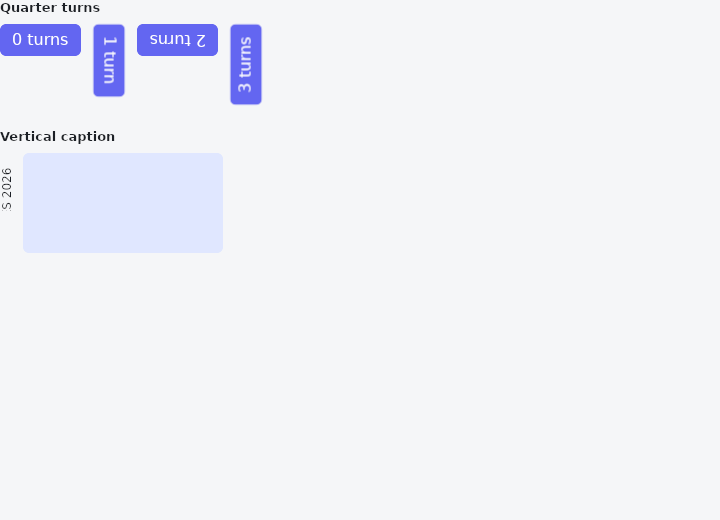
From frus-examples/widgets/src/features/layout/widgets/rotated_box.rs:
//! `RotatedBox` — turns its child by whole quarter turns, and the layout turns with it.
//!
//! The difference from `Transform::rotate` is the layout: a rotated box swaps its width
//! and height, so its neighbours make room for the turned child. A transform only moves
//! the pixels, and the neighbours still see the unturned box.

use frus::{Align, Color, Container, Insets, MainAxisSize, Padding, RotatedBox, Row, Text, Widget};

use crate::common::shared::{section, sections};

pub fn example() -> Box<dyn Widget> {
    sections(vec![
        // 0 to 3 quarter turns, clockwise. The odd ones are taller than wide.
        Box::new(section(
            "Quarter turns",
            Row::new()
                .main_axis_size(MainAxisSize::Min)
                .cross_axis_alignment(Align::Start)
                .spacing(12.0)
                .child(RotatedBox::new(0).child(label("0 turns")))
                .child(RotatedBox::new(1).child(label("1 turn")))
                .child(RotatedBox::new(2).child(label("2 turns")))
                .child(RotatedBox::new(3).child(label("3 turns"))),
        )),
        // The usual use: a vertical caption beside content, taking only the width of
        // one line.
        Box::new(section(
            "Vertical caption",
            Row::new()
                .main_axis_size(MainAxisSize::Min)
                .spacing(8.0)
                .child(RotatedBox::new(3).child(Padding::new(
                    Insets::symmetric(4.0, 0.0),
                    Text::new("SALES 2026").size(12.0),
                )))
                .child(
                    Container::new()
                        .width(200.0)
                        .height(100.0)
                        .radius(6.0)
                        .color(Color::hex("#E0E7FF")),
                ),
        )),
    ])
}

fn label(text: &str) -> Container {
    Container::new()
        .padding_each(6.0, 12.0, 6.0, 12.0)
        .radius(6.0)
        .color(Color::hex("#6366F1"))
        .child(Text::new(text).color(Color::hex("#FFFFFF")))
}
Properties
| Method | Argument | Effect |
|---|---|---|
.child() | child: impl Widget<Msg> + 'static | Sets the rotated child. |
Behaviour
Rotates its child by quarter_turns quarter turns (90° each, clockwise), changing the layout: for an odd number of quarters, the box presented to the parent has the child's width and height swapped (a vertical label in a sidebar, a rotated chart axis label…).
The child is measured at its natural size, centred, then rotated about the centre of the box — hit-testing counter-rotates the point (as Transform does). A negative quarter_turns turns the other way; only the remainder modulo 4 counts.
See also
- IndexedStack: several children in one box, only one of them shown.
- Baseline: lines text up on the line its letters sit on.
- SafeArea: keeps its child clear of status bars, notches, the gesture handle and the keyboard.
- LayoutBuilder & OrientationBuilder: builds from the room actually given, so a component adapts wherever it is placed.
- CustomMultiChildLayout: children measured and placed by a function you write.
- The guide: Laying out a screen
- API reference:
RotatedBox
Source: crates/frus-widgets/src/rotatedbox.rs @ e6fba33f5b42