LayoutBuilder and OrientationBuilder
Purpose
Builds from the room actually given, so a component adapts wherever it is placed.
Signature
pub struct LayoutBuilder<Msg = crate::callback::Callback> { .. }

impl LayoutBuilder {
    pub fn new<W: Widget<Msg> + 'static>(build: impl Fn(Size) -> W + 'static) -> Self;
}
pub struct OrientationBuilder;
Example
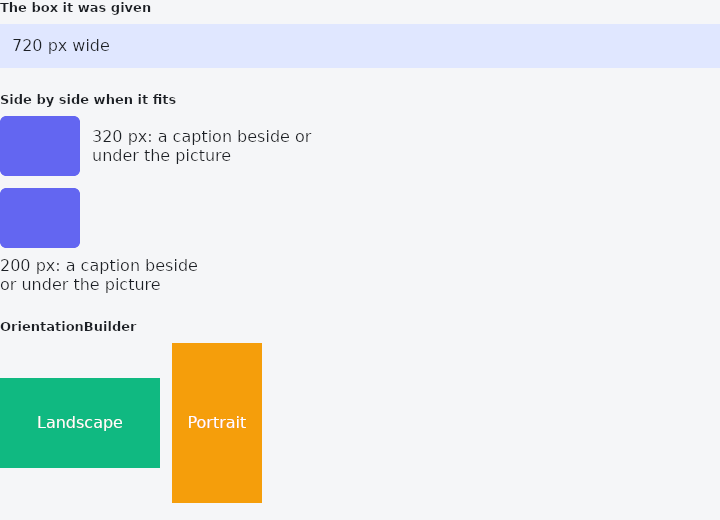
From frus-examples/widgets/src/features/layout/widgets/layout_builder.rs:
//! `LayoutBuilder` and `OrientationBuilder` — build from the room actually given, not
//! from the window's size, so a component adapts wherever it is placed.
//!
//! The content is built on the fly every frame from the box: it keeps no state of its
//! own, so keep the closure cheap and put any state outside it.

use frus::{
    Align, Alignment, Color, Column, Container, Expanded, LayoutBuilder, Orientation,
    OrientationBuilder, Row, SizedBox, Text, Widget,
};

use crate::common::shared::{section, sections};

pub fn example() -> Box<dyn Widget> {
    sections(vec![
        // The closure receives the size of its box. Resize the window to see the number
        // (and the layout) change.
        Box::new(section(
            "The box it was given",
            LayoutBuilder::new(|size| {
                Container::new()
                    .padding(12.0)
                    .color(Color::hex("#E0E7FF"))
                    .child(Text::new(format!("{:.0} px wide", size.width)))
            }),
        )),
        // The common use: one arrangement when there is room, another when there is not.
        // The same card, at two widths.
        Box::new(section(
            "Side by side when it fits",
            Column::new()
                .cross_axis_alignment(Align::Start)
                .spacing(12.0)
                .child(SizedBox::new(card()).width(320.0))
                .child(SizedBox::new(card()).width(200.0)),
        )),
        // `OrientationBuilder` answers the simpler question: is the box wider than tall?
        // Here it is asked about two fixed boxes.
        Box::new(section(
            "OrientationBuilder",
            Row::new()
                .spacing(12.0)
                .child(SizedBox::new(oriented()).width(160.0).height(90.0))
                .child(SizedBox::new(oriented()).width(90.0).height(160.0)),
        )),
    ])
}

/// A picture and a text: in a row from 260 px up, stacked below that.
fn card() -> LayoutBuilder {
    LayoutBuilder::new(|size| -> Box<dyn Widget> {
        let picture = Container::new()
            .width(80.0)
            .height(60.0)
            .radius(6.0)
            .color(Color::hex("#6366F1"));
        let caption =
            Text::new(format!("{:.0} px: ", size.width) + "a caption beside or under the picture")
                .wrap();
        if size.width >= 260.0 {
            Box::new(
                Row::new()
                    .spacing(12.0)
                    .child(picture)
                    .child(Expanded::new(caption)),
            )
        } else {
            Box::new(
                Column::new()
                    .cross_axis_alignment(Align::Start)
                    .spacing(8.0)
                    .child(picture)
                    .child(caption),
            )
        }
    })
}

fn oriented() -> LayoutBuilder {
    OrientationBuilder::new(|orientation| {
        let (label, color) = match orientation {
            Orientation::Landscape => ("Landscape", "#10B981"),
            Orientation::Portrait => ("Portrait", "#F59E0B"),
        };
        Container::new()
            .color(Color::hex(color))
            .alignment(Alignment::CENTER)
            .child(Text::new(label).color(Color::hex("#FFFFFF")))
    })
}
Properties
| Type | Method | Argument | Effect |
|---|---|---|---|
LayoutBuilder | .width() | width: f32 | Sets the width, in logical pixels. |
LayoutBuilder | .height() | height: f32 | Sets the height, in logical pixels. |
LayoutBuilder | .flex() | grow: f32 | Flex growth factor along the parent's main axis. |
Behaviour
LayoutBuilder
Builds its child from the available size (size → widget).
OrientationBuilder
The box, not the window: a panel beside a list on a wide window is portrait if it is taller than wide, whatever the window is. It takes all the room on offer, as an Aligned does, so that the box it decides on is that room and not the size of what it built; along a row's or a column's own direction, shared with other children, the room is only its content's. It is a LayoutBuilder, with what that says about state: the content is built on the fly from the box, and keeps none.
use frus_core::Orientation;
use frus_widgets::{column, row, text, OrientationBuilder};

let _gallery: frus_widgets::LayoutBuilder<()> = OrientationBuilder::new(|orientation| {
    match orientation {
        Orientation::Landscape => row![text("a"), text("b")],
        Orientation::Portrait => column![text("a"), text("b")],
    }
});
See also
- RotatedBox: turns its child by quarter turns, and the layout turns with it.
- SafeArea: keeps its child clear of status bars, notches, the gesture handle and the keyboard.
- CustomMultiChildLayout: children measured and placed by a function you write.
- OverflowBar: a row of buttons that becomes a column when they stop fitting.
- TwoPane & responsive: a list and its detail side by side when wide, one at a time when narrow.
- The guide: Laying out a screen
- API reference:
LayoutBuilder - API reference:
OrientationBuilder
Source: crates/frus-widgets/src/layoutbuilder.rs, crates/frus-widgets/src/listener.rs @ e6fba33f5b42