Baseline
Purpose
Lines text up on the line its letters sit on.
Signature
pub struct Baseline<Msg = crate::callback::Callback> { .. }

impl Baseline {
    pub fn new(baseline: f32) -> Self;
}
Example
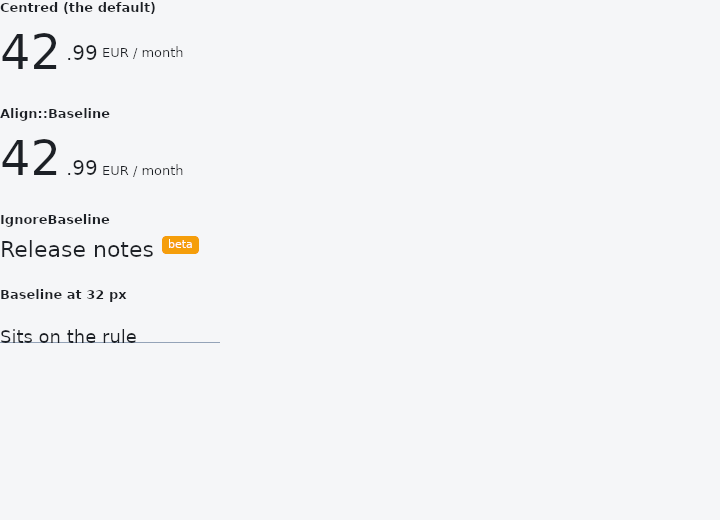
From frus-examples/widgets/src/features/layout/widgets/baseline.rs:
//! `Baseline`, `IgnoreBaseline` and `Align::Baseline` — line text up on the line its
//! letters sit on, not on the tops or middles of the boxes.

use frus::{
    Align, Baseline, Border, BorderSide, Color, Container, IgnoreBaseline, MainAxisSize, Row,
    Stack, Text, Widget,
};

use crate::common::shared::{section, sections};

pub fn example() -> Box<dyn Widget> {
    sections(vec![
        // Centred, a big number and its small unit do not read as one line: the unit
        // floats halfway up.
        Box::new(section("Centred (the default)", price(Align::Center))),
        // On their baselines they share a line, whatever their sizes.
        Box::new(section("Align::Baseline", price(Align::Baseline))),
        // A row aligned on baselines follows the lowest one it finds. `IgnoreBaseline`
        // takes a piece out of the reckoning — here, the badge's text, which would
        // otherwise drag the line down to its own.
        Box::new(section(
            "IgnoreBaseline",
            Row::new()
                .main_axis_size(MainAxisSize::Min)
                .cross_axis_alignment(Align::Baseline)
                .spacing(8.0)
                .child(Text::new("Release notes").size(22.0))
                .child(
                    IgnoreBaseline::new().child(
                        Container::new()
                            .padding_each(2.0, 6.0, 2.0, 6.0)
                            .radius(4.0)
                            .color(Color::hex("#F59E0B"))
                            .child(Text::new("beta").size(11.0).color(Color::hex("#FFFFFF"))),
                    ),
                ),
        )),
        // `Baseline` puts its child's baseline a set distance below its top — to pin a
        // label to a rule drawn elsewhere. The grey line is 32 px down; so is the text's
        // baseline.
        Box::new(section(
            "Baseline at 32 px",
            Stack::new()
                .layer(
                    Container::new()
                        .width(220.0)
                        .height(32.0)
                        .box_border(Border {
                            bottom: BorderSide::new(Color::hex("#94A3B8"), 1.0),
                            ..Border::NONE
                        }),
                )
                .layer(Baseline::new(32.0).child(Text::new("Sits on the rule").size(18.0))),
        )),
    ])
}

fn price(align: Align) -> Row {
    Row::new()
        .main_axis_size(MainAxisSize::Min)
        .cross_axis_alignment(align)
        .spacing(4.0)
        .child(Text::new("42").size(48.0))
        .child(Text::new(".99").size(20.0))
        .child(Text::new("EUR / month").size(13.0))
}
Properties
| Method | Argument | Effect |
|---|---|---|
.child() | child: impl Widget<Msg> + 'static | Sets the positioned child. |
Behaviour
Positions its child so that the child's baseline lands baseline logical pixels below the top of this box, then grows to contain it.
It is the manual version of what Align::Baseline does automatically: a way to pin one piece of text to a line decided elsewhere — a caption on a rule, a label on a grid, a figure on a chart's axis.
If the child's own baseline is already lower than baseline there is nowhere to push it up to, and the child is top-aligned instead. A child with no text in it has no baseline; its bottom edge is used, which is what a plain box amounts to.
Baseline::new(24.0).child(Text::new("on the line"))
There is no choice of baseline kind. The measurement here is the alphabetic baseline — the line Latin, Greek and Cyrillic sit on — because that is the one the text engine reports. An ideographic baseline is a different number and offering a name for it that resolved to the same value would be worse than not offering it.
See also
- Stack & Positioned: children layered in the same box, pinned to its edges or aligned in it.
- IndexedStack: several children in one box, only one of them shown.
- RotatedBox: turns its child by quarter turns, and the layout turns with it.
- SafeArea: keeps its child clear of status bars, notches, the gesture handle and the keyboard.
- LayoutBuilder & OrientationBuilder: builds from the room actually given, so a component adapts wherever it is placed.
- The guide: Laying out a screen
- API reference:
Baseline
Source: crates/frus-widgets/src/baseline.rs @ e6fba33f5b42