AspectRatio
Purpose
A box whose height follows from its width.
Signature
pub struct AspectRatio<Msg = crate::callback::Callback> { .. }

impl AspectRatio {
    pub fn new(ratio: f32) -> Self;
}
Example
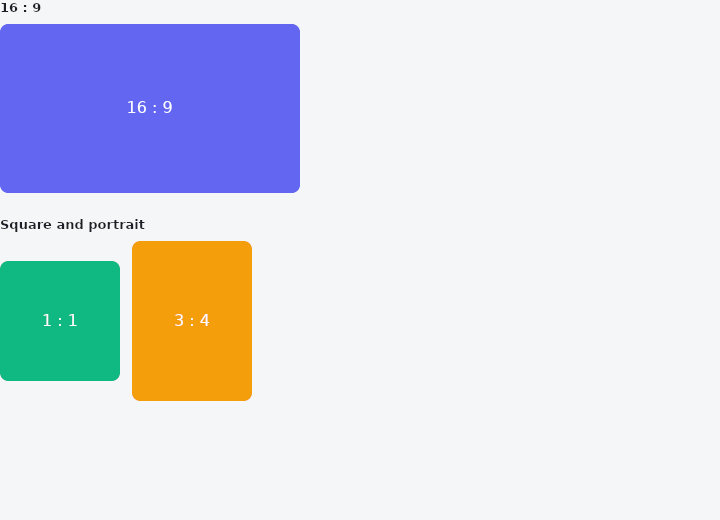
From frus-examples/widgets/src/features/layout/widgets/aspect_ratio.rs:
//! `AspectRatio` — a box whose height follows from its width: a video frame, a photo
//! card, a square tile.

use frus::{Alignment, AspectRatio, Color, Container, Row, SizedBox, Text, Widget};

use crate::common::shared::{section, sections};

pub fn example() -> Box<dyn Widget> {
    sections(vec![
        // The box takes the width it is given and derives its height: 16:9 at 300 px
        // wide is about 169 px tall. The ratio is width / height.
        Box::new(section(
            "16 : 9",
            SizedBox::new(AspectRatio::new(16.0 / 9.0).child(frame("16 : 9", "#6366F1")))
                .width(300.0),
        )),
        // The same rule gives a square, or a box taller than it is wide.
        Box::new(section(
            "Square and portrait",
            Row::new()
                .spacing(12.0)
                .child(
                    SizedBox::new(AspectRatio::new(1.0).child(frame("1 : 1", "#10B981")))
                        .width(120.0),
                )
                .child(
                    SizedBox::new(AspectRatio::new(3.0 / 4.0).child(frame("3 : 4", "#F59E0B")))
                        .width(120.0),
                ),
        )),
    ])
}

fn frame(label: &str, color: &str) -> Container {
    Container::new()
        .radius(8.0)
        .color(Color::hex(color))
        .alignment(Alignment::CENTER)
        .child(Text::new(label).color(Color::hex("#FFFFFF")))
}
Properties
| Method | Argument | Effect |
|---|---|---|
.child() | child: impl Widget<Msg> + 'static | Sets the child constrained to the ratio. |
Behaviour
Imposes a width / height ratio on its box: the box takes the full available width, then derives its height from the ratio (height = width / ratio). In a column 100 wide, AspectRatio::new(2.0) gives a 100×50 box and AspectRatio::new(0.5) a 100×200 one.
The ratio follows the usual convention (taffy's included): width / height — 2.0 is twice as wide as it is tall, 0.5 twice as tall as it is wide.
The child inherits the box: it stretches in height, along the cross axis, and fills the width if it grows (flex) — typically an image or a solid background.
See also
- ConstrainedBox, LimitedBox & Intrinsic: floors and ceilings on a child's size, or the size its content would like.
- UnconstrainedBox & OverflowBox: let a child be a size its parent did not offer.
- FittedBox: scales its child to fit its box, following a BoxFit rule.
- FractionallySizedBox: a box sized as a fraction of the room its parent offers.
- Wrap & ListBody: a row that flows onto new lines when it runs out of room.
- The guide: Laying out a screen
- API reference:
AspectRatio
Source: crates/frus-widgets/src/aspectratio.rs @ e6fba33f5b42