Listener
Purpose
The pointer's raw down, move, up and hover events.
Signature
pub struct Listener<Msg = crate::callback::Callback> { .. }

impl Listener {
    pub fn new(
        child: impl Widget<Msg> + 'static,
        on_event: impl Fn(ListenerEvent) -> Option<Msg> + 'static,
    ) -> Self;
}
Example
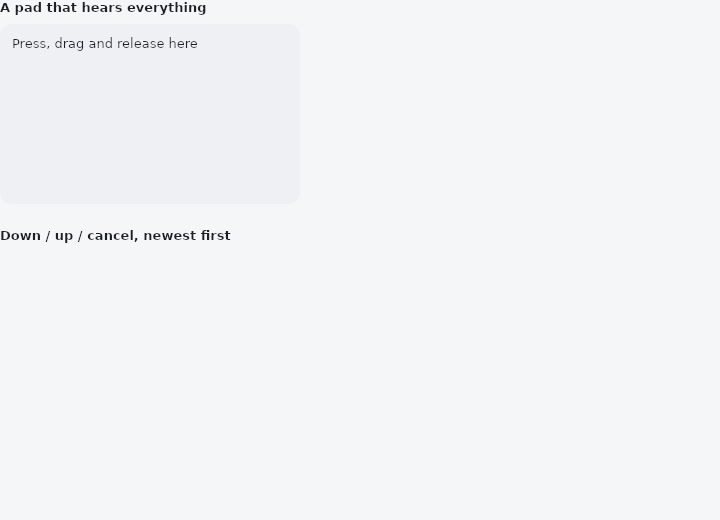
From frus-examples/widgets/src/features/interaction/widgets/listener.rs:
//! `Listener` — the pointer's raw events on a widget: down, move, up, cancel, and a mouse's
//! hover, with positions in the widget's own coordinates.
//!
//! Unlike `GestureDetector` it recognises nothing and competes with nothing: a button
//! inside still takes its tap, a scroll still scrolls, and the listener hears every event
//! anyway. A pointer that went down inside is followed wherever it goes until it lifts —
//! what a drawing surface or a custom control is built on.

use std::collections::VecDeque;

use frus::{
    Align, Column, Container, Listener, ListenerEvent, ListenerEventKind, Point, Positioned, Stack,
    StackFit, State, StateContext, StatefulWidget, Text, Widget,
};

use crate::common::shared::{section, sections};

pub fn example() -> Box<dyn Widget> {
    Box::new(RawPointer.into_widget())
}

struct RawPointer;

struct RawPointerState {
    /// The latest events, newest first.
    log: VecDeque<String>,
    /// Where the pointer is, while it is over the pad or pressed.
    dot: Option<Point>,
    pressed: bool,
}

/// How many events the log keeps.
const LOG: usize = 6;
const PAD: (f32, f32) = (300.0, 180.0);
const DOT: f32 = 20.0;

impl StatefulWidget for RawPointer {
    type State = RawPointerState;

    fn create_state(&self) -> RawPointerState {
        RawPointerState {
            log: VecDeque::new(),
            dot: None,
            pressed: false,
        }
    }
}

impl RawPointerState {
    fn record(&mut self, event: ListenerEvent) {
        match event.kind {
            ListenerEventKind::Down => self.pressed = true,
            ListenerEventKind::Up | ListenerEventKind::Cancel => self.pressed = false,
            ListenerEventKind::Move | ListenerEventKind::Hover => {}
        }
        self.dot = Some(event.local);
        // Hover moves come many per second: log only the events that change something.
        if event.kind != ListenerEventKind::Hover && event.kind != ListenerEventKind::Move {
            let device = if event.touch { "finger" } else { "mouse" };
            self.log.push_front(format!(
                "{:?} at ({:.0}, {:.0}) — {device}",
                event.kind, event.local.x, event.local.y
            ));
            self.log.truncate(LOG);
        }
    }
}

impl State for RawPointerState {
    type Widget = RawPointer;

    fn build(&self, cx: &StateContext<Self>) -> Box<dyn Widget> {
        let scheme = &cx.theme().scheme;

        let mut pad = Stack::new()
            .width(PAD.0)
            .height(PAD.1)
            .fit(StackFit::Expand)
            .layer(
                Container::new()
                    .radius(12.0)
                    .color(scheme.surface_container_high)
                    .padding(12.0)
                    .child(Text::new("Press, drag and release here").size(13.0)),
            );
        if let Some(at) = self.dot {
            let size = if self.pressed { DOT * 1.6 } else { DOT };
            pad = pad.layer(
                Positioned::new(
                    Container::new()
                        .width(size)
                        .height(size)
                        .radius(size / 2.0)
                        .color(if self.pressed {
                            scheme.primary
                        } else {
                            scheme.outline
                        }),
                )
                .left(at.x - size / 2.0)
                .top(at.y - size / 2.0),
            );
        }

        // The closure answers every event with a message, or with `None` to ignore it.
        let record = cx.handler(|s: &mut Self, event: ListenerEvent| s.record(event));
        let listener = Listener::new(pad, move |event| Some(record(event)));

        let log = self.log.iter().fold(
            Column::new()
                .spacing(4.0)
                .cross_axis_alignment(Align::Start),
            |column, line| column.child(Text::new(line.clone()).size(13.0)),
        );

        sections(vec![
            Box::new(section("A pad that hears everything", listener)),
            Box::new(section("Down / up / cancel, newest first", log)),
        ])
    }
}
Properties
No builder methods: everything is set through the constructor.
Behaviour
Unlike a GestureDetector, it does not recognise anything and competes with nothing: a scroll under the finger still scrolls, a button still takes its tap, and the listener hears every event all the same. A pointer that went down inside it is followed wherever it goes until it lifts. That is what a drawing surface, a custom slider or a gesture of the application's own is built on.
use frus_widgets::{Container, Listener, ListenerEventKind};

#[derive(Clone)]
enum Msg { Ink(f32, f32), Lift }

let _pad: Listener<Msg> = Listener::new(Container::new().width(300.0).height(200.0), |event| {
    match event.kind {
        ListenerEventKind::Down | ListenerEventKind::Move => {
            Some(Msg::Ink(event.local.x, event.local.y))
        }
        ListenerEventKind::Up | ListenerEventKind::Cancel => Some(Msg::Lift),
        ListenerEventKind::Hover => None,
    }
});
A transparent wrapper: it is its child, laid out and painted exactly as the child would be without it. Every listener under the pointer hears a press, the innermost first.
See also
- InkWell: makes any content pressable, with an ink ripple, hover and focus feedback.
- MouseRegion: the mouse entering, moving over and leaving a widget, and the cursor there.
- Draggable & DragTarget: pick a thing up and drop it on something else, with a payload.
- InteractiveViewer: a viewport whose content can be panned and zoomed.
- Focus & traversal: which widgets the keyboard reaches, in what order, and focusing from code.
- The guide: Taking input
- API reference:
Listener
Source: crates/frus-widgets/src/listener.rs @ e6fba33f5b42