GestureDetector
Purpose
Taps, double taps, long presses, right clicks and drags on any widget.
Signature
pub struct GestureDetector<Msg = crate::callback::Callback> { .. }

impl GestureDetector {
    pub fn new(child: impl Widget<Msg> + 'static) -> Self;
}
Example
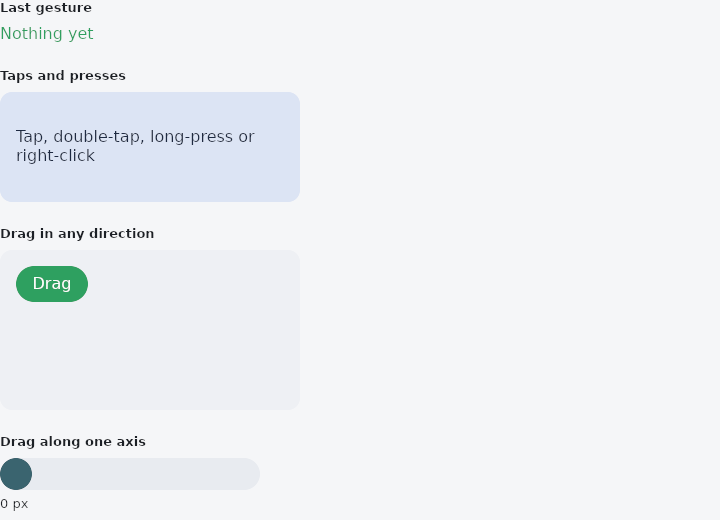
From frus-examples/widgets/src/features/interaction/widgets/gesture_detector.rs:
//! `GestureDetector` — taps, double taps, long presses, secondary clicks and drags on any
//! widget, answered with your own handlers.
//!
//! It adds no look of its own (no ink, no hover): it is the widget it wraps. For a
//! pressable surface with feedback, use `InkWell` or a button.

use frus::{
    Align, Alignment, Column, Container, GestureDetector, PanAxis, Point, Positioned, Stack,
    StackFit, State, StateContext, StatefulWidget, Text, Widget,
};

use crate::common::shared::{section, sections};

pub fn example() -> Box<dyn Widget> {
    Box::new(GestureDemo.into_widget())
}

/// The demo is a small `StatefulWidget`: the state remembers the last gesture and where
/// the dragged chip is, and `cx.handler` turns a reported value into a state change.
struct GestureDemo;

struct GestureDemoState {
    last: String,
    taps: u32,
    /// Where the free chip sits in its box.
    chip: Point,
    /// Where the horizontal-only handle sits along its track.
    handle: f32,
}

impl StatefulWidget for GestureDemo {
    type State = GestureDemoState;

    fn create_state(&self) -> GestureDemoState {
        GestureDemoState {
            last: "Nothing yet".to_string(),
            taps: 0,
            chip: Point::new(16.0, 16.0),
            handle: 0.0,
        }
    }
}

/// The free chip's box and the chip itself, in logical pixels.
const AREA: (f32, f32) = (300.0, 160.0);
const CHIP: (f32, f32) = (72.0, 36.0);
const TRACK: f32 = 260.0;
const HANDLE: f32 = 32.0;

impl State for GestureDemoState {
    type Widget = GestureDemo;

    fn build(&self, cx: &StateContext<Self>) -> Box<dyn Widget> {
        let scheme = &cx.theme().scheme;

        // Four discrete gestures on one pad. With a double tap set, a single tap waits
        // 300 ms to be sure it is not the first half of one.
        let pad = GestureDetector::new(
            Container::new()
                .width(AREA.0)
                .height(110.0)
                .padding(16.0)
                .radius(12.0)
                .color(scheme.secondary_container)
                .alignment(Alignment::CENTER)
                .child(
                    Text::new("Tap, double-tap, long-press or right-click")
                        .color(scheme.on_secondary_container),
                ),
        )
        .on_tap(cx.callback(|s| {
            s.taps += 1;
            s.last = format!("Tap (#{})", s.taps);
        }))
        .on_double_tap(cx.callback(|s| s.last = "Double tap".to_string()))
        .on_long_press(cx.callback(|s| s.last = "Long press".to_string()))
        .on_secondary_tap(cx.callback(|s| s.last = "Secondary tap (right click)".to_string()));

        // A drag: `on_pan_update` reports where the pointer is and how far it moved.
        let moved = cx.handler(|s: &mut Self, delta: Point| {
            s.chip.x = (s.chip.x + delta.x).clamp(0.0, AREA.0 - CHIP.0);
            s.chip.y = (s.chip.y + delta.y).clamp(0.0, AREA.1 - CHIP.1);
            s.last = format!("Pan to ({:.0}, {:.0})", s.chip.x, s.chip.y);
        });
        let ended = cx.handler(|s: &mut Self, velocity: Point| {
            s.last = format!("Pan end, {:.0} px/s across", velocity.x);
        });
        let chip = GestureDetector::new(
            Container::new()
                .width(CHIP.0)
                .height(CHIP.1)
                .radius(18.0)
                .color(scheme.primary)
                .alignment(Alignment::CENTER)
                .child(Text::new("Drag").color(scheme.on_primary)),
        )
        .on_pan_update(move |_local, delta| moved(delta))
        .on_pan_end(ended);
        let free_area = Stack::new()
            .width(AREA.0)
            .height(AREA.1)
            .fit(StackFit::Expand)
            .layer(
                Container::new()
                    .radius(12.0)
                    .color(scheme.surface_container_high),
            )
            .layer(Positioned::new(chip).left(self.chip.x).top(self.chip.y));

        // `pan_axis` keeps only one direction — and inside a vertical scroll, leaves the
        // vertical drags to the scroll.
        let slide = cx.handler(|s: &mut Self, delta: Point| {
            s.handle = (s.handle + delta.x).clamp(0.0, TRACK - HANDLE);
        });
        let handle = GestureDetector::new(
            Container::new()
                .width(HANDLE)
                .height(HANDLE)
                .radius(HANDLE / 2.0)
                .color(scheme.tertiary),
        )
        .pan_axis(PanAxis::Horizontal)
        .on_pan_update(move |_local, delta| slide(delta));
        let track = Stack::new()
            .width(TRACK)
            .height(HANDLE)
            .fit(StackFit::Expand)
            .layer(
                Container::new()
                    .radius(HANDLE / 2.0)
                    .color(scheme.surface_container_highest),
            )
            .layer(Positioned::new(handle).left(self.handle).top(0.0));

        sections(vec![
            Box::new(section(
                "Last gesture",
                Text::new(self.last.clone()).color(scheme.primary),
            )),
            Box::new(section("Taps and presses", pad)),
            Box::new(section("Drag in any direction", free_area)),
            Box::new(section(
                "Drag along one axis",
                Column::new()
                    .spacing(6.0)
                    .cross_axis_alignment(Align::Start)
                    .child(track)
                    .child(Text::new(format!("{:.0} px", self.handle)).size(13.0)),
            )),
        ])
    }
}
Properties
| Method | Argument | Effect |
|---|---|---|
.on_tap() | message: impl Into<Msg> | A tap: a press and a release in the same place, with a finger or the main mouse button. |
.on_double_tap() | message: impl Into<Msg> | A double tap: two taps in quick succession, close together. |
.on_long_press() | message: impl Into<Msg> | A long press: a press held still for half a second. The release that follows is not also a tap. |
.on_secondary_tap() | message: impl Into<Msg> | A secondary tap: a click of the secondary mouse button, usually the right one, which on a desktop opens a context menu. |
.on_pan_start() | build: impl Fn(Point) -> R1 + 'static | A drag has begun: build is given where the pointer went down, in the detector's own coordinates. A drag begins once the pointer has moved far enough to not be a tap. |
.on_pan_update() | build: impl Fn(Point, Point) -> R1 + 'static | The pointer moved during a drag: build is given where it is now, in the detector's own coordinates, and how far it moved since the last update. |
.on_pan_end() | build: impl Fn(Point) -> R1 + 'static | The drag ended: build is given the velocity the pointer lifted at, in logical pixels per second. |
.pan_axis() | axis: PanAxis | The other component of each movement is not reported, and inside a scroll that runs the other way the drag no longer competes with it. Free, a pan, by default. |
Behaviour
Answers gestures on its child with the application's messages: a tap, a double tap, a long press, a secondary click (the right mouse button), and a drag.
It is a transparent wrapper: it is its child, laid out and painted exactly as the child would be without it, and it hears the gestures that land inside the child. A detector that wants a tap gives the child none of its own look — no ink, no hover — which is what InkWell and the buttons are for.
use frus_widgets::{GestureDetector, Text};

#[derive(Clone)]
enum Msg { Open, Like, Menu }

let _photo: GestureDetector<Msg> = GestureDetector::new(Text::new("photo"))
    .on_tap(Msg::Open)
    .on_double_tap(Msg::Like)
    .on_secondary_tap(Msg::Menu);
A tap waits when a double tap is possible. With both set, a first tap is not a tap until 300 ms have gone by without a second one, as on every platform: the second tap of a double tap is not also two taps. With only a tap set, it answers at once.
See also
- InkWell: makes any content pressable, with an ink ripple, hover and focus feedback.
- MouseRegion: the mouse entering, moving over and leaving a widget, and the cursor there.
- Listener: the pointer's raw down, move, up and hover events.
- The guide: Taking input
- API reference:
GestureDetector
Source: crates/frus-widgets/src/gesturedetector.rs @ e6fba33f5b42