Focus
Purpose
Which widgets the keyboard reaches, in what order, and focusing from code.
Signature
pub struct Focus<Msg = crate::callback::Callback>(Wrapper<Msg>);

impl Focus {
    pub fn new(child: impl Widget<Msg> + 'static) -> Self;
}
Example
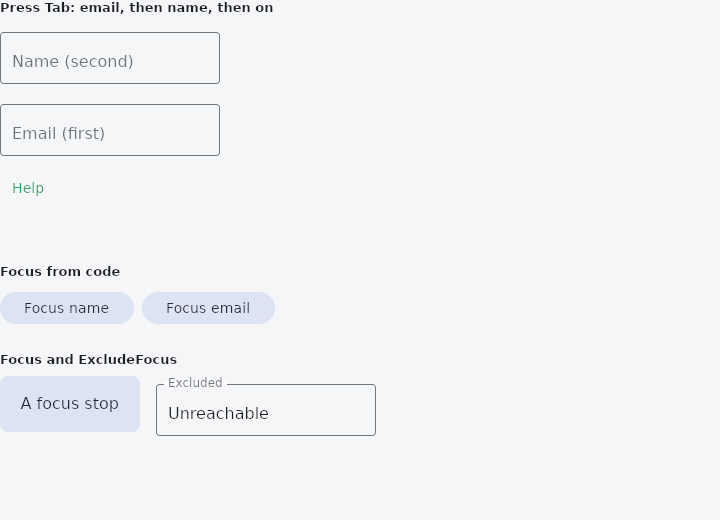
From frus-examples/widgets/src/features/interaction/widgets/focus.rs:
//! Focus — which widgets the keyboard can reach and in what order: `Focus`,
//! `FocusTraversalGroup`, `FocusTraversalOrder`, `ExcludeFocus`, `ExcludeFocusTraversal`,
//! and moving the focus from code with `host::focus`.
//!
//! Text fields and buttons are focus stops already; Tab walks them in tree order. These
//! wrappers change that from outside, without touching the widgets themselves.

use frus::{
    component, host, keyed, Align, Alignment, Button, Column, Container, ExcludeFocus,
    ExcludeFocusTraversal, Focus, FocusTraversalGroup, FocusTraversalOrder, Text, TextField,
    Variant, Widget, Wrap,
};

use crate::common::shared::{section, sections};

pub fn example() -> Box<dyn Widget> {
    Box::new(component(|cx| {
        let name = cx.use_state(String::new);
        let email = cx.use_state(String::new);
        let help = cx.use_state(|| false);
        let scheme = &cx.theme().scheme;

        let (set_name, set_email, toggle_help) = (name.clone(), email.clone(), help.clone());
        // A field wrapped in `keyed(key, ..)` can be focused from code with
        // `host::focus(key)` — after a validation error, or when a dialog opens.
        let name_field = keyed(
            "focus-demo-name",
            TextField::new(name.get())
                .label("Name (second)")
                .on_input(move |text| set_name.set(text)),
        );
        let email_field = keyed(
            "focus-demo-email",
            TextField::new(email.get())
                .label("Email (first)")
                .on_input(move |text| set_email.set(text)),
        );

        // Tab order by number, resolved inside the group only: the email field comes
        // first although it is built second. The help button is clickable, but Tab
        // passes it by.
        let form = FocusTraversalGroup::new(
            Column::new()
                .spacing(12.0)
                .cross_axis_alignment(Align::Start)
                .child(FocusTraversalOrder::new(2.0, name_field))
                .child(FocusTraversalOrder::new(1.0, email_field))
                .child(ExcludeFocusTraversal::new(
                    Button::new(if help.get() { "Hide help" } else { "Help" })
                        .variant(Variant::Text)
                        .on_press(move || toggle_help.update(|shown| *shown = !*shown)),
                ))
                .child(if help.get() {
                    Text::new("Fields marked (first) and (second) show the Tab order.").size(13.0)
                } else {
                    Text::new("")
                }),
        );

        let jump = Wrap::new()
            .gap(8.0)
            .run_gap(8.0)
            .child(
                Button::new("Focus name")
                    .variant(Variant::Tonal)
                    .on_press(|| host::focus("focus-demo-name")),
            )
            .child(
                Button::new("Focus email")
                    .variant(Variant::Tonal)
                    .on_press(|| host::focus("focus-demo-email")),
            );

        // `Focus` makes anything a stop — a custom control that wants the keyboard.
        // `ExcludeFocus` takes a whole subtree out of reach: here, a field behind a panel
        // the user should not get to.
        let stops = Wrap::new()
            .gap(16.0)
            .run_gap(16.0)
            .child(Focus::new(
                Container::new()
                    .width(140.0)
                    .height(56.0)
                    .radius(8.0)
                    .color(scheme.secondary_container)
                    .alignment(Alignment::CENTER)
                    .child(Text::new("A focus stop").color(scheme.on_secondary_container)),
            ))
            .child(ExcludeFocus::new(
                TextField::new("Unreachable").label("Excluded"),
            ));

        sections(vec![
            Box::new(section("Press Tab: email, then name, then on", form)),
            Box::new(section("Focus from code", jump)),
            Box::new(section("Focus and ExcludeFocus", stops)),
        ])
    }))
}
Properties
| Method | Argument | Effect |
|---|---|---|
.can_request_focus() | can: bool | false leaves the subtree in place and simply stops being a stop. |
.skip_traversal() | — | Focusable by a click, passed over by Tab. |
.on_focus_change() | on_change: impl Fn(bool) -> R + 'static | A move between two widgets inside it says nothing. |
Behaviour
Makes its child a focus stop: somewhere Tab can land and a click can focus, even when the child itself has no opinion about focus.
See also
- Draggable & DragTarget: pick a thing up and drop it on something else, with a payload.
- InteractiveViewer: a viewport whose content can be panned and zoomed.
- Shortcuts & Actions: keyboard shortcuts: a keystroke means an intent, an intent runs a handler.
- FocusableActionDetector & KeyboardListener: a custom control that answers the keyboard for itself.
- IgnorePointer & AbsorbPointer: switch off the pointer for a subtree: let taps through, or stop them.
- The guide: Taking input
- API reference:
Focus
Source: crates/frus-widgets/src/focus.rs @ e6fba33f5b42