Draggable and DragTarget
Purpose
Pick a thing up and drop it on something else, with a payload.
Signature
pub struct Draggable<Msg = crate::callback::Callback> { .. }

impl Draggable {
    pub fn new(child: impl Widget<Msg> + 'static) -> Self;
}
pub struct DragTarget<Msg = crate::callback::Callback> { .. }

impl DragTarget {
    pub fn new(child: impl Widget<Msg> + 'static) -> Self;
}
Example
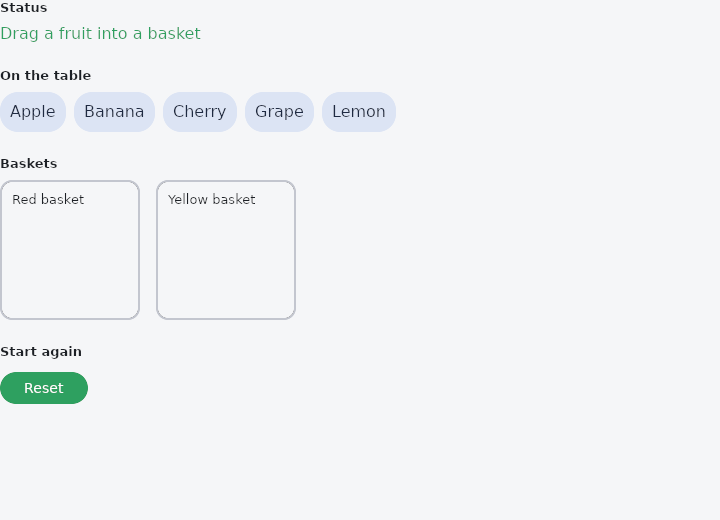
From frus-examples/widgets/src/features/interaction/widgets/drag_and_drop.rs:
//! `Draggable` and `DragTarget` — pick a thing up and drop it somewhere else.
//!
//! What travels between the two is a **payload**: a `u64` you choose (an id, an index) and
//! get back in the target's `on_drop`. The two ends need not know of each other.
//! Inside a scrollable list, lift with `.long_press()` so the list can still scroll.

use frus::{
    Align, Button, Column, Container, DragTarget, Draggable, State, StateContext, StatefulWidget,
    Text, Widget, Wrap,
};

use crate::common::shared::{section, sections};

pub fn example() -> Box<dyn Widget> {
    Box::new(Sorting.into_widget())
}

const FRUITS: [&str; 5] = ["Apple", "Banana", "Cherry", "Grape", "Lemon"];

/// Where each fruit is: unsorted, or in one of the baskets.
#[derive(Clone, Copy, PartialEq)]
enum Place {
    Table,
    Basket(usize),
}

const BASKETS: [&str; 2] = ["Red", "Yellow"];

struct Sorting;

struct SortingState {
    places: [Place; FRUITS.len()],
    message: String,
}

impl StatefulWidget for Sorting {
    type State = SortingState;

    fn create_state(&self) -> SortingState {
        SortingState {
            places: [Place::Table; FRUITS.len()],
            message: "Drag a fruit into a basket".to_string(),
        }
    }
}

impl SortingState {
    fn drop_into(&mut self, fruit: u64, basket: usize) {
        if let Some(place) = self.places.get_mut(fruit as usize) {
            *place = Place::Basket(basket);
            self.message = format!("{} → {} basket", FRUITS[fruit as usize], BASKETS[basket]);
        }
    }
}

impl State for SortingState {
    type Widget = Sorting;

    fn build(&self, cx: &StateContext<Self>) -> Box<dyn Widget> {
        let scheme = &cx.theme().scheme;

        // A fruit chip, draggable, carrying its index as the payload.
        let chip = |index: usize| {
            Draggable::new(
                Container::new()
                    .padding(10.0)
                    .radius(18.0)
                    .color(scheme.secondary_container)
                    .child(Text::new(FRUITS[index]).color(scheme.on_secondary_container)),
            )
            .payload(index as u64)
            // Told whether a target took it: the moment to explain a refusal.
            .on_dropped(cx.handler(|s: &mut Self, accepted: bool| {
                if !accepted {
                    s.message = "Dropped outside a basket: nothing moved".to_string();
                }
            }))
        };
        let in_place = |place: Place| {
            (0..FRUITS.len())
                .filter(|&i| self.places[i] == place)
                .fold(Wrap::new().gap(8.0).run_gap(8.0), |row, i| {
                    row.child(chip(i))
                })
        };

        // A basket: a target that accepts some payloads and says what to do with them.
        let basket = |index: usize| {
            DragTarget::new(
                Container::new()
                    .width(140.0)
                    .height(140.0)
                    .padding(10.0)
                    .radius(12.0)
                    .border(2.0, scheme.outline_variant)
                    .child(
                        Column::new()
                            .spacing(8.0)
                            .cross_axis_alignment(Align::Start)
                            .child(Text::new(format!("{} basket", BASKETS[index])).size(13.0))
                            .child(in_place(Place::Basket(index))),
                    ),
            )
            // The yellow basket refuses cherries and grapes: the highlight only shows
            // over a target that would accept what is being dragged.
            .accepts(move |fruit| index == 0 || !matches!(fruit, 2 | 3))
            .on_drop(cx.handler(move |s: &mut Self, fruit: u64| s.drop_into(fruit, index)))
        };

        let reset = cx.callback(|s| {
            s.places = [Place::Table; FRUITS.len()];
            s.message = "Back on the table".to_string();
        });

        sections(vec![
            Box::new(section(
                "Status",
                Text::new(self.message.clone()).color(scheme.primary),
            )),
            Box::new(section("On the table", in_place(Place::Table))),
            Box::new(section(
                "Baskets",
                Wrap::new()
                    .gap(16.0)
                    .run_gap(16.0)
                    .child(basket(0))
                    .child(basket(1)),
            )),
            Box::new(section("Start again", Button::new("Reset").on_press(reset))),
        ])
    }
}
Properties
| Type | Method | Argument | Effect |
|---|---|---|---|
Draggable | .payload() | payload: u64 | What this item carries — an id, an index, anything the application can map back. It is handed to the target's on_drop untouched. |
Draggable | .long_press() | — | Lift on a long press rather than on the first movement. |
Draggable | .ghost_opacity() | opacity: f32 | How solid the item left behind looks while its copy is being dragged. 1.0 leaves it untouched, 0.0 makes the lift look like a removal. |
Draggable | .on_dropped() | message: impl Fn(bool) -> R + 'static | The message sent when the drag ends, true if a target took it. |
DragTarget | .on_drop() | message: impl Fn(u64) -> R + 'static | The message sent when an accepted item is dropped here, given its payload. |
DragTarget | .accepts() | predicate: impl Fn(u64) -> bool + 'static | Which payloads this target takes; everything, by default. |
DragTarget | .on_files() | message: impl Fn(Vec<PathBuf>) -> R + 'static | The message sent when files dragged onto the window from outside the application are dropped here, given their paths, in the order the system listed them. |
DragTarget | .accepts_files() | predicate: impl Fn(&[PathBuf]) -> bool + 'static | Which sets of files this target takes; every set, by default, once it has DragTarget::on_files. The predicate sees every path being dragged, so a target that wants images can refuse a drag that holds anything else — and is then not highlighted, so the answer shows before the button is let go. |
DragTarget | .highlight() | color: Color | The colour of the "drop it here" highlight. Unset, it is the theme's accent; set it to Color::TRANSPARENT to draw none and paint your own from the child. |
Behaviour
Draggable
A widget that can be picked up and dropped on a DragTarget.
It carries a payload: a number the application chooses and gets back on the drop, so the two ends of the gesture never have to know each other's types. What floats under the pointer is the widget's own appearance, lifted out of the frame — nothing to build twice, and nothing that can drift from what is on screen.
DragTarget
A widget that can be dropped onto.
By default it takes anything. accepts narrows that — a column that only takes tasks of its own project, say — and a target that refuses is not highlighted and not offered the drop, so the answer is visible before the finger lifts rather than after.
It can also take files dragged onto the window from outside the application — from the system's file manager, say — once it is given DragTarget::on_files:
DragTarget::new(drop_area)
    .on_files(Msg::Attach)
    .accepts_files(|paths| paths.iter().all(|p| p.extension().is_some_and(|e| e == "png")))
See also
- MouseRegion: the mouse entering, moving over and leaving a widget, and the cursor there.
- Listener: the pointer's raw down, move, up and hover events.
- InteractiveViewer: a viewport whose content can be panned and zoomed.
- Focus & traversal: which widgets the keyboard reaches, in what order, and focusing from code.
- Shortcuts & Actions: keyboard shortcuts: a keystroke means an intent, an intent runs a handler.
- The guide: Taking input
- API reference:
Draggable - API reference:
DragTarget
Source: crates/frus-widgets/src/dragdrop.rs, crates/frus-widgets/src/dragdrop.rs @ e6fba33f5b42