Skeleton
Purpose
A pulsing placeholder in the shape of content that is still loading.
Signature
pub struct Skeleton { .. }

impl Skeleton {
    pub fn new() -> Self;
}
Example
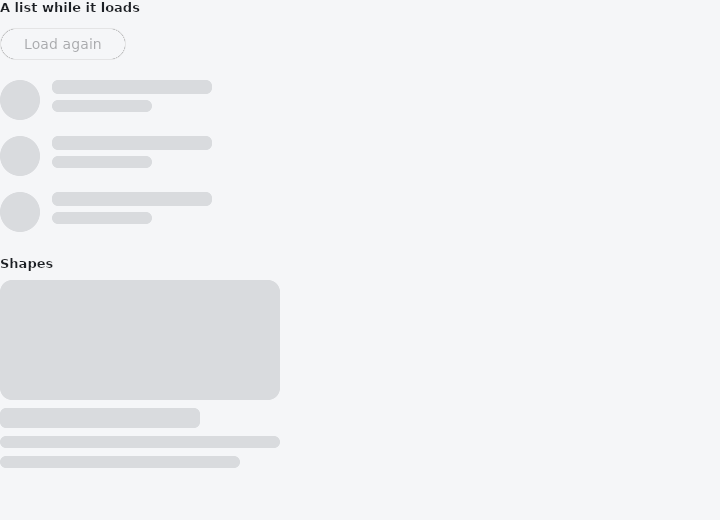
From frus-examples/widgets/src/features/feedback/widgets/skeleton.rs:
//! `Skeleton` — a pulsing grey placeholder in the shape of content that is still loading.
//! Better than a spinner when you know the layout: the page does not jump when the data
//! arrives.

use std::time::Duration;

use frus::{
    Align, Button, CircleAvatar, Column, Row, Skeleton, State, StateContext, StatefulWidget, Text,
    Variant, Widget,
};

use crate::common::shared::{section, sections};

pub fn example() -> Box<dyn Widget> {
    Box::new(SkeletonDemo.into_widget())
}

struct SkeletonDemo;

struct SkeletonDemoState {
    loading: bool,
}

impl StatefulWidget for SkeletonDemo {
    type State = SkeletonDemoState;

    fn create_state(&self) -> SkeletonDemoState {
        SkeletonDemoState { loading: true }
    }
}

/// The row as it looks while loading: blocks the size of the avatar and the two lines.
fn loading_row() -> Row {
    Row::new()
        .spacing(12.0)
        .cross_axis_alignment(Align::Center)
        .child(Skeleton::new().width(40.0).height(40.0).radius(20.0))
        .child(
            Column::new()
                .cross_axis_alignment(Align::Start)
                .spacing(6.0)
                .child(Skeleton::new().width(160.0).height(14.0))
                .child(Skeleton::new().width(100.0).height(12.0)),
        )
}

/// The same row once loaded: same sizes, so nothing moves.
fn loaded_row(name: &str, role: &str) -> Row {
    Row::new()
        .spacing(12.0)
        .cross_axis_alignment(Align::Center)
        .child(CircleAvatar::initials(name).radius(20.0))
        .child(
            Column::new()
                .spacing(2.0)
                .cross_axis_alignment(Align::Start)
                .child(Text::new(name))
                .child(Text::new(role).size(12.0)),
        )
}

impl State for SkeletonDemoState {
    type Widget = SkeletonDemo;

    fn build(&self, cx: &StateContext<Self>) -> Box<dyn Widget> {
        // Pretend the data takes two seconds to arrive.
        if self.loading {
            cx.use_interval(
                Duration::from_secs(2),
                cx.callback(|s: &mut SkeletonDemoState| s.loading = false),
            );
        }

        let people = [
            ("Ada", "Engineer"),
            ("Grace", "Admiral"),
            ("Alan", "Mathematician"),
        ];
        let list = people.iter().fold(
            Column::new()
                .cross_axis_alignment(Align::Start)
                .spacing(16.0),
            |list, (name, role)| {
                if self.loading {
                    list.child(loading_row())
                } else {
                    list.child(loaded_row(name, role))
                }
            },
        );

        sections(vec![
            Box::new(section(
                "A list while it loads",
                Column::new()
                    .spacing(16.0)
                    .cross_axis_alignment(Align::Start)
                    .child(
                        Button::new("Load again")
                            .variant(Variant::Outlined)
                            .enabled(!self.loading)
                            .on_press(cx.callback(|s: &mut SkeletonDemoState| s.loading = true)),
                    )
                    .child(list),
            )),
            // Any size and corner: a picture, a heading, a paragraph.
            Box::new(section(
                "Shapes",
                Column::new()
                    .cross_axis_alignment(Align::Start)
                    .spacing(8.0)
                    .child(Skeleton::new().width(280.0).height(120.0).radius(12.0))
                    .child(Skeleton::new().width(200.0).height(20.0))
                    .child(Skeleton::new().width(280.0).height(12.0))
                    .child(Skeleton::new().width(240.0).height(12.0)),
            )),
        ])
    }
}
Properties
| Method | Argument | Effect |
|---|---|---|
.width() | width: f32 | Sets the width, in logical pixels. |
.height() | height: f32 | Sets the height, in logical pixels. |
.radius() | radius: f32 | Sets the corner radius. |
Behaviour
An animated loading block.
See also
- Alert: a message box in the flow of the page: info, success, warning or error.
- LinearProgressIndicator & CircularProgressIndicator: how far along some work is, or that it is under way.
- Tooltip: a short label that appears while the pointer rests on a widget.
- The guide: Screens, navigation and dialogs
- API reference:
Skeleton
Source: crates/frus-widgets/src/skeleton.rs @ e6fba33f5b42