DraggableScrollableSheet
Purpose
A panel along the bottom that follows the finger between resting heights.
Signature
pub struct DraggableScrollableSheet<Msg = crate::callback::Callback> { .. }

impl DraggableScrollableSheet {
    pub fn new(child: impl Widget<Msg> + 'static) -> Self;
}
Example
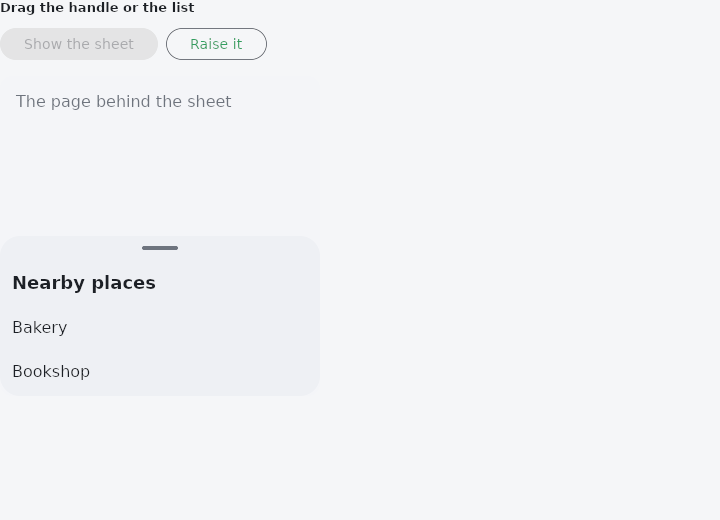
From frus-examples/widgets/src/features/feedback/widgets/draggable_sheet.rs:
//! `DraggableScrollableSheet` — a panel along the bottom that follows the finger between
//! the heights it may rest at, and hands the gesture over to the list inside it (the
//! "nearby places" sheet of a map). It is not modal: the page behind stays usable.

use frus::{
    host, keyed, Align, Button, Column, Container, Curve, DraggableScrollableSheet, Flex,
    FontWeight, Justify, Row, SheetTo, SingleChildScrollView, Stack, State, StateContext,
    StatefulWidget, Text, Variant, Widget, Wrap,
};

use crate::common::shared::{section, sections};

/// The preview is phone-sized: it fits a phone's page and reads like a screen.
const PREVIEW_WIDTH: f32 = 320.0;

pub fn example() -> Box<dyn Widget> {
    Box::new(SheetDemo.into_widget())
}

/// The key that lets code move the sheet (`host::sheet_to`).
const PLACES_SHEET: &str = "places-sheet";

const PLACES: [&str; 10] = [
    "Bakery", "Bookshop", "Café", "Cinema", "Library", "Market", "Museum", "Park", "Pharmacy",
    "Station",
];

struct SheetDemo;

struct SheetDemoState {
    /// Lowered all the way, the sheet sends `on_dismiss` and the page removes it.
    hidden: bool,
}

impl StatefulWidget for SheetDemo {
    type State = SheetDemoState;

    fn create_state(&self) -> SheetDemoState {
        SheetDemoState { hidden: false }
    }
}

impl State for SheetDemoState {
    type Widget = SheetDemo;

    fn build(&self, cx: &StateContext<Self>) -> Box<dyn Widget> {
        let theme = cx.theme();

        // The sheet draws nothing itself: the surface, its corners and the drag handle
        // are the content's.
        let list = PLACES.iter().fold(
            Column::new().cross_axis_alignment(Align::Start),
            |list, place| list.child(Container::new().padding(12.0).child(Text::new(*place))),
        );
        let handle = Row::new().main_axis_alignment(Justify::Center).child(
            Container::new()
                .width(36.0)
                .height(4.0)
                .radius(2.0)
                .color(theme.muted)
                .margin(10.0),
        );
        let panel = Container::new()
            .color(theme.scheme.surface_container_high)
            .radius(20.0)
            // The list scrolls inside the sheet: the column fills the panel and the
            // scroll view takes what the handle and the title leave.
            .child(
                Flex::column()
                    .flex(1.0)
                    .align(Align::Stretch)
                    .child(handle)
                    .child(
                        Container::new().padding(12.0).child(
                            Text::new("Nearby places")
                                .size(18.0)
                                .weight(FontWeight::SemiBold),
                        ),
                    )
                    .child(SingleChildScrollView::new().flex(1.0).child(list)),
            );

        // The sheet fills the box it is in and sits along its bottom. Its heights are
        // shares of that box: it rests at a quarter, a half or all of it.
        let mut map = Stack::new().width(PREVIEW_WIDTH).height(320.0).layer(
            Container::new()
                .width(PREVIEW_WIDTH)
                .height(320.0)
                .radius(12.0)
                .color(theme.scheme.surface_container)
                .padding(16.0)
                .child(Text::new("The page behind the sheet").color(theme.muted)),
        );
        if !self.hidden {
            map = map.layer(keyed(
                PLACES_SHEET,
                DraggableScrollableSheet::new(panel)
                    .initial(0.5)
                    .min(0.25)
                    .snap_sizes([0.5])
                    .on_dismiss(cx.callback(|s: &mut SheetDemoState| s.hidden = true)),
            ));
        }

        let controls = Wrap::new()
            .gap(8.0)
            .run_gap(8.0)
            .child(
                Button::new("Show the sheet")
                    .enabled(self.hidden)
                    .on_press(cx.callback(|s: &mut SheetDemoState| s.hidden = false)),
            )
            // Moving the sheet from code is an effect, not state: where it rests
            // afterwards is the sheet's own, as if a finger had put it there.
            .child(
                Button::new("Raise it")
                    .variant(Variant::Outlined)
                    .on_press(|| {
                        host::sheet_to(PLACES_SHEET, SheetTo::size(1.0).animate(0.3, Curve::ease()))
                    }),
            );

        sections(vec![Box::new(section(
            "Drag the handle or the list",
            Column::new()
                .spacing(12.0)
                .cross_axis_alignment(Align::Stretch)
                .child(controls)
                .child(map),
        ))])
    }
}
Properties
| Method | Argument | Effect |
|---|---|---|
.initial() | size: f32 | The height it starts at, before a finger has moved it. Half, unset. |
.min() | size: f32 | The lowest height it rests at while it stays open. A quarter, unset. |
.max() | size: f32 | The highest height it goes to. All of the box, unset. |
.snap() | snap: bool | Whether a release settles on a stop — min, max and any snap_sizes — rather than coasting. |
.snap_sizes() | sizes: impl IntoIterator<Item = f32> | Heights between min and max it may also settle on, and snapping turned on. |
.on_dismiss() | message: impl Into<Msg> | The message sent once the sheet has been lowered to nothing — which this also allows, below min. Unset, min is as low as it goes. |
Behaviour
Heights are shares of that box. It starts at initial (half), moves between min (a quarter) and max (all of it), and coasts where it is thrown unless it is told to snap — which giving it snap_sizes does. Given on_dismiss, it can be lowered past min to nothing, and the message goes once it has arrived there.
The retained height is keyed by identity, and forgotten on the first frame the sheet is not in the tree: an application that removes a dismissed sheet and shows it again gets it back at its initial height.
See also
- SnackBar & ScaffoldMessenger: a short message at the bottom of the screen that goes away by itself.
- BottomSheet: a modal panel sliding up from the bottom, for contextual actions.
- MaterialBanner: a message across the top of the content that stays until it is answered.
- Alert: a message box in the flow of the page: info, success, warning or error.
- LinearProgressIndicator & CircularProgressIndicator: how far along some work is, or that it is under way.
- The guide: Screens, navigation and dialogs
- API reference:
DraggableScrollableSheet
Source: crates/frus-widgets/src/sheet.rs @ e6fba33f5b42