Timeline
Purpose
A vertical chronology of events joined by a line.
Signature
pub struct Timeline<Msg = crate::callback::Callback> { .. }

impl Timeline {
    pub fn new() -> Self;
}
Example
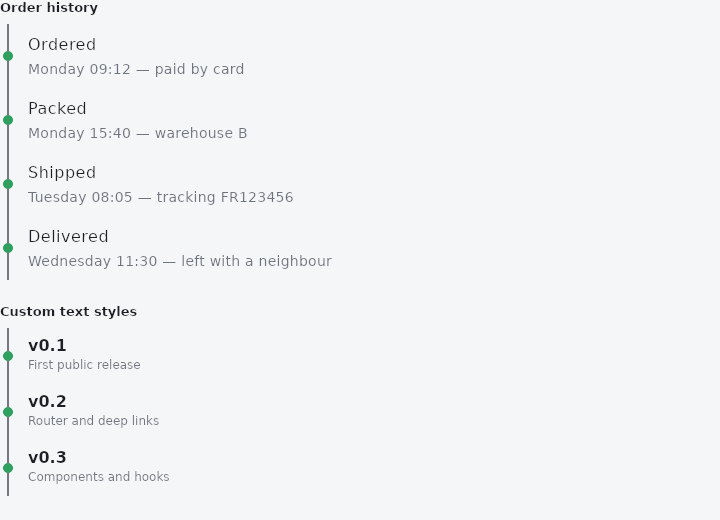
From frus-examples/widgets/src/features/display/widgets/timeline.rs:
//! `Timeline` — a vertical chronology: events joined by a line, each marked with a dot.

use frus::{FontWeight, TextStyle, Timeline, Widget};

use crate::common::shared::{section, sections};

pub fn example() -> Box<dyn Widget> {
    sections(vec![
        // Each event is a title and a line of detail, oldest first.
        Box::new(section(
            "Order history",
            Timeline::new()
                .event("Ordered", "Monday 09:12 — paid by card")
                .event("Packed", "Monday 15:40 — warehouse B")
                .event("Shipped", "Tuesday 08:05 — tracking FR123456")
                .event("Delivered", "Wednesday 11:30 — left with a neighbour"),
        )),
        // The two lines' type is the theme's unless you say otherwise.
        Box::new(section(
            "Custom text styles",
            Timeline::new()
                .title_text_style(TextStyle::new(16.0).weight(FontWeight::Bold))
                .detail_text_style(TextStyle::new(12.0))
                .event("v0.1", "First public release")
                .event("v0.2", "Router and deep links")
                .event("v0.3", "Components and hooks"),
        )),
    ])
}
Properties
| Method | Argument | Effect |
|---|---|---|
.event() | title: impl Into<String>, detail: impl Into<String> | Adds an event, title and detail, oldest to most recent. |
.title_text_style() | style: TextStyle | — |
.detail_text_style() | style: TextStyle | — |
Behaviour
A vertical chronology.
See also
- Table: a controlled grid of text or widget cells; the app sorts and selects.
- BarChart & LineChart: themed charts for comparing amounts and reading trends.
- Tree: a hierarchy of rows that expand, collapse and select.
- Breadcrumb: the trail from the top of a hierarchy to the current page.
- The guide: Text, colour and the theme
- API reference:
Timeline
Source: crates/frus-widgets/src/timeline.rs @ e6fba33f5b42