Size
Purpose
Explicit transitions driven by a number the app owns: an AnimationController.
Signature
pub struct Size { .. }

impl Size {
    pub const fn new(width: f32, height: f32) -> Self;
}
Example
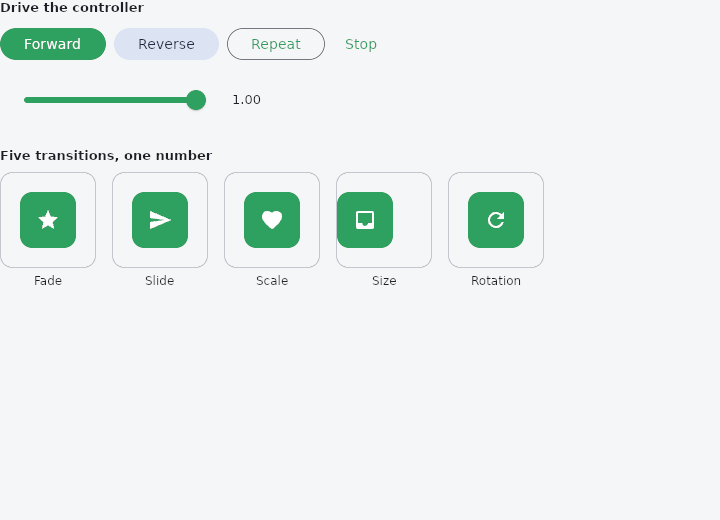
From frus-examples/widgets/src/features/animation/widgets/transitions.rs:
//! The explicit transitions — `FadeTransition`, `SlideTransition`, `ScaleTransition`,
//! `SizeTransition` (and a turn with `Transform::rotate`) — driven by a number **the
//! application owns**, here an `AnimationController`.
//!
//! The implicit `Animated*` widgets run on the framework's clock. These take the progress
//! itself, so several of them handed the same number move together, and a gesture or a
//! slider can drive them as well as a timer.

use std::f32::consts::TAU;
use std::time::Duration;

use frus::{
    component, eased, Align, Alignment, AnimationController, Button, Color, Column, Container,
    Curve, FadeTransition, Icon, IconData, Icons, Row, ScaleTransition, SizeTransition, SlideFrom,
    SlideTransition, Slider, Text, Transform, Variant, Widget, Wrap,
};

use crate::common::shared::{section, sections};

/// How often the controller is advanced while it runs: about sixty times a second.
const FRAME: Duration = Duration::from_millis(16);

pub fn example() -> Box<dyn Widget> {
    Box::new(component(|cx| {
        // The driver lives as long as the component: `use_ref`, because changing it is not
        // by itself a reason to rebuild. The value the widgets read is a `use_state`, so
        // that each step of the animation does rebuild.
        // It starts at 1: everything in place. Press Reverse to send it all away.
        let controller = cx.use_ref(|| {
            let mut controller = AnimationController::unit();
            controller.set_value(1.0);
            controller
        });
        let progress = cx.use_state(|| 1.0_f32);

        // While the controller is running, a timer advances it once a frame. When it comes
        // to rest, the next build stops asking for the timer, and the timer stops.
        if controller.with(AnimationController::is_animating) {
            let (driver, shown) = (controller.clone(), progress.clone());
            cx.use_interval(FRAME, move || {
                driver.update(|c| {
                    c.tick(FRAME.as_secs_f32());
                });
                shown.set(driver.with(AnimationController::value));
            });
        }

        // Each control changes the controller, then the state, so a build follows and
        // sees that the controller is now running.
        let run = |change: fn(&mut AnimationController)| {
            let (driver, shown) = (controller.clone(), progress.clone());
            move || {
                driver.update(change);
                shown.set(driver.with(AnimationController::value));
            }
        };
        let controls = Wrap::new()
            .gap(8.0)
            .run_gap(8.0)
            .child(Button::new("Forward").on_press(run(|c| c.forward(0.6, Curve::Linear))))
            .child(
                Button::new("Reverse")
                    .variant(Variant::Tonal)
                    .on_press(run(|c| c.reverse(0.6, Curve::Linear))),
            )
            .child(
                // There and back, forever, until stopped.
                Button::new("Repeat")
                    .variant(Variant::Outlined)
                    .on_press(run(|c| c.repeat(1.2, true, Curve::Linear))),
            )
            .child(
                Button::new("Stop")
                    .variant(Variant::Text)
                    .on_press(run(AnimationController::stop)),
            );

        // The same number can come from a finger: dragging the slider stops the controller
        // and sets its value.
        let (driver, shown) = (controller.clone(), progress.clone());
        let t = progress.get();
        let scrub = Row::new()
            .spacing(12.0)
            .cross_axis_alignment(Align::Center)
            .child(Slider::new(t).width(220.0).on_change(move |value| {
                driver.update(|c| {
                    c.stop();
                    c.set_value(value);
                });
                shown.set(value);
            }))
            .child(Text::new(format!("{t:.2}")).size(13.0));

        // The progress is linear; each transition shapes it with a curve of its own.
        let e = eased(t, &Curve::ease_out());
        let scheme = &cx.theme().scheme;
        let square = |icon| tile(icon, scheme.primary, scheme.on_primary);
        let outline = scheme.outline_variant;

        sections(vec![
            Box::new(section(
                "Drive the controller",
                Column::new()
                    .spacing(12.0)
                    .cross_axis_alignment(Align::Start)
                    .child(controls)
                    .child(scrub),
            )),
            Box::new(section(
                "Five transitions, one number",
                Wrap::new()
                    .gap(16.0)
                    .run_gap(16.0)
                    .child(stage(
                        outline,
                        "Fade",
                        FadeTransition::new(e, square(Icons::STAR)),
                    ))
                    // `from_edge`: 0 is beyond the edge, 1 is in place.
                    .child(stage(
                        outline,
                        "Slide",
                        SlideTransition::from_edge(SlideFrom::Left, e, square(Icons::SEND)),
                    ))
                    .child(stage(
                        outline,
                        "Scale",
                        ScaleTransition::new(e, square(Icons::FAVORITE)),
                    ))
                    // Reveals the child down to a fraction of its height.
                    .child(stage(
                        outline,
                        "Size",
                        SizeTransition::new(e, square(Icons::INBOX)),
                    ))
                    .child(stage(
                        outline,
                        "Rotation",
                        Transform::rotate(e * TAU).child(square(Icons::REFRESH)),
                    )),
            )),
        ])
    }))
}

/// A square to animate.
fn tile(icon: IconData, background: Color, foreground: Color) -> Container {
    Container::new()
        .width(56.0)
        .height(56.0)
        .radius(12.0)
        .color(background)
        .alignment(Alignment::CENTER)
        .child(Icon::new(icon).color(foreground))
}

/// A fixed box for one transition, clipped so a slide stays inside it, and its name.
fn stage(outline: Color, name: &str, child: impl Widget + 'static) -> Column {
    Column::new()
        .spacing(6.0)
        .cross_axis_alignment(Align::Center)
        .child(
            Container::new()
                .width(96.0)
                .height(96.0)
                .radius(12.0)
                .clip()
                .border(1.0, outline)
                .alignment(Alignment::CENTER)
                .child(child),
        )
        .child(Text::new(name).size(12.0))
}
Properties
No builder methods: everything is set through the constructor.
Behaviour
A 2D size (width × height).
See also
- AnimatedSwitcher: the old child leaves as the new one arrives when the value changes.
- AnimatedCrossFade: cross-fades between two known children, the box moving between their sizes.
- DecoratedBoxTransition & DefaultTextStyleTransition: a whole decoration or text style, part of the way from one to another.
- Curve: the shape of a motion, separate from its duration.
- Icon::animated & AnimatedIcons: an icon that morphs between two marks: menu and close, play and pause.
- The guide: Animation
- API reference:
Size
Source: crates/frus-core/src/geometry.rs @ e6fba33f5b42