AnimatedPadding
Purpose
Insets a child by an amount that moves to each new value.
Signature
pub struct AnimatedPadding<Msg = crate::callback::Callback> { .. }

impl AnimatedPadding {
    pub fn new(
        padding: f32,
        duration: f32,
        curve: Curve,
        child: impl Widget<Msg> + 'static,
    ) -> Self;
}
Example
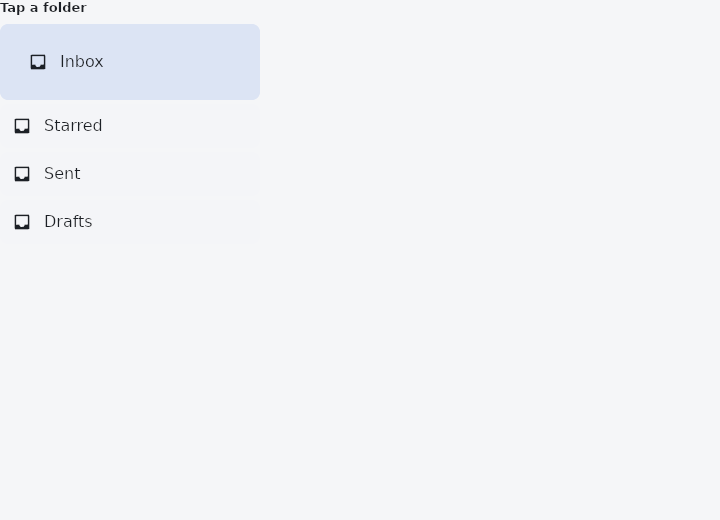
From frus-examples/widgets/src/features/animation/widgets/animated_padding.rs:
//! `AnimatedPadding` — insets its child by an amount that moves to each new value, so a
//! selected row can step in rather than jump.

use frus::{
    component, Align, AnimatedPadding, Column, Component, Container, Curve, Icon, Icons, Row, Text,
    Widget,
};

use crate::common::shared::{section, sections};

const FOLDERS: [&str; 4] = ["Inbox", "Starred", "Sent", "Drafts"];

pub fn example() -> Box<dyn Widget> {
    sections(vec![
        // Tap a row: the chosen one is indented further, and the change is animated.
        Box::new(section("Tap a folder", folders())),
    ])
}

fn folders() -> Component {
    component(|cx| {
        let selected = cx.use_state(|| 0_usize);
        let current = selected.get();
        let scheme = &cx.theme().scheme;

        let rows = FOLDERS.iter().enumerate().fold(
            Column::new()
                .spacing(4.0)
                .cross_axis_alignment(Align::Start),
            |column, (index, name)| {
                let chosen = index == current;
                let pick = selected.clone();
                column.child(
                    Container::new()
                        .width(260.0)
                        .radius(8.0)
                        .color(if chosen {
                            scheme.secondary_container
                        } else {
                            scheme.surface_container
                        })
                        .on_click(move || pick.set(index))
                        // Only the padding animates; the row's colour changes at once.
                        .child(AnimatedPadding::new(
                            if chosen { 28.0 } else { 12.0 },
                            0.25,
                            Curve::ease_out(),
                            Row::new()
                                .spacing(12.0)
                                .cross_axis_alignment(Align::Center)
                                .child(Icon::new(Icons::INBOX).size(20.0))
                                .child(Text::new(*name)),
                        )),
                )
            },
        );
        Box::new(rows)
    })
}
Properties
No builder methods: everything is set through the constructor.
Behaviour
Moves its child's inset rather than letting the space around it jump.
Unlike the two above, this one is layout: the interpolated padding is injected while the tree is being measured, so everything beside and below the child follows it as it moves. That is the point of padding animating at all — a paint-time offset would slide the child over its neighbours instead of making room.
use frus_core::Curve;
use frus_widgets::{AnimatedPadding, Text};

let selected = true;
let _row: AnimatedPadding<()> = AnimatedPadding::new(
    if selected { 24.0 } else { 8.0 },
    0.2,
    Curve::ease_in_out(),
    Text::new("Inbox"),
);
See also
- Opacity & AnimatedOpacity: see-through by a fixed amount, or fading to each new amount.
- AnimatedAlign: slides a child to a new anchor inside its box.
- AnimatedPositioned: a stack layer whose pins move: panels that slide in, cards that travel.
- AnimatedScale, AnimatedRotation & AnimatedSlide: grow, turn or shift a child to each new value without moving its neighbours.
- AnimatedDefaultTextStyle: the text style handed down to a subtree, moving to each new style.
- The guide: Animation
- API reference:
AnimatedPadding
Source: crates/frus-widgets/src/animated.rs @ e6fba33f5b42