AnimatedFractionallySizedBox
Purpose
A fraction of the room, moving to each new fraction.
Signature
pub struct AnimatedFractionallySizedBox<Msg = crate::callback::Callback> { .. }

impl AnimatedFractionallySizedBox {
    pub fn new(duration: f32, curve: Curve, child: impl Widget<Msg> + 'static) -> Self;
}
Example
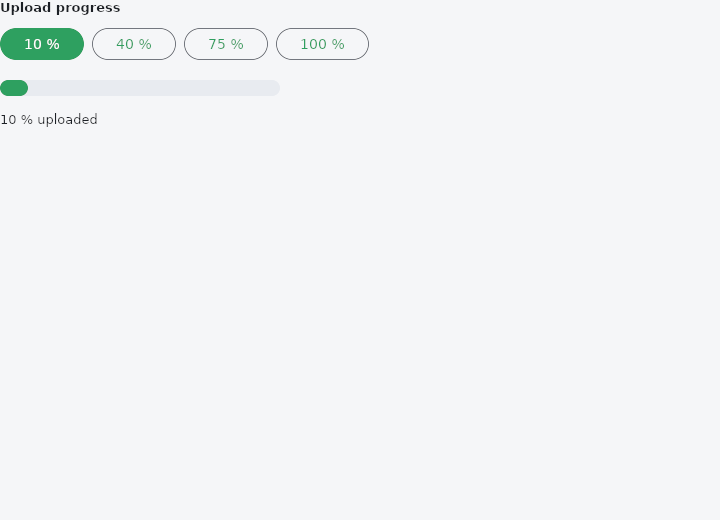
From frus-examples/widgets/src/features/animation/widgets/animated_fractionally_sized_box.rs:
//! `AnimatedFractionallySizedBox` — a box sized as a fraction of the room it is given,
//! moving to each new fraction: a progress bar, a panel that widens.

use frus::{
    component, Align, Alignment, AnimatedFractionallySizedBox, Button, Column, Component,
    Container, Curve, Text, Variant, Widget, Wrap,
};

use crate::common::shared::{section, sections};

const STEPS: [f32; 4] = [0.1, 0.4, 0.75, 1.0];

pub fn example() -> Box<dyn Widget> {
    sections(vec![
        // The track is 280 px wide; the fill is a fraction of it, whatever the track's size.
        Box::new(section("Upload progress", progress())),
    ])
}

fn progress() -> Component {
    component(|cx| {
        let step = cx.use_state(|| 0_usize);
        let fraction = STEPS[step.get()];
        let scheme = &cx.theme().scheme;

        let buttons = STEPS.iter().enumerate().fold(
            Wrap::new().gap(8.0).run_gap(8.0),
            |row, (index, value)| {
                let pick = step.clone();
                row.child(
                    Button::new(format!("{:.0} %", value * 100.0))
                        .variant(if index == step.get() {
                            Variant::Filled
                        } else {
                            Variant::Outlined
                        })
                        .on_press(move || pick.set(index)),
                )
            },
        );

        Box::new(
            Column::new()
                .spacing(16.0)
                .cross_axis_alignment(Align::Start)
                .child(buttons)
                .child(
                    Container::new()
                        .width(280.0)
                        .height(16.0)
                        .radius(8.0)
                        .color(scheme.surface_container_highest)
                        .alignment(Alignment::CENTER_LEFT)
                        .child(
                            AnimatedFractionallySizedBox::new(
                                0.5,
                                Curve::ease_out(),
                                Container::new().radius(8.0).color(scheme.primary),
                            )
                            .width_factor(fraction)
                            .height_factor(1.0),
                        ),
                )
                .child(Text::new(format!("{:.0} % uploaded", fraction * 100.0)).size(13.0)),
        )
    })
}
Properties
| Method | Argument | Effect |
|---|---|---|
.width_factor() | factor: f32 | Fraction 0.0..=1.0 of the parent's width (clamped to >= 0). |
.height_factor() | factor: f32 | Fraction 0.0..=1.0 of the parent's height (clamped to >= 0). |
Behaviour
Grows and shrinks its share of the parent rather than taking the new share at once.
The quantity is a fraction and not a length, which is the reason to reach for this rather than an animated size: a bar filling half its row, a panel taking two thirds of a page, a sheet at a third of the height — none of them knows what those come to, and a resize of the window during the movement is answered by the layout rather than by a number that was right when it was written.
use frus_core::Curve;
use frus_widgets::{AnimatedFractionallySizedBox, Container};

let full = true;
let _bar: AnimatedFractionallySizedBox<()> =
    AnimatedFractionallySizedBox::new(0.3, Curve::ease_out(), Container::new())
        .width_factor(if full { 1.0 } else { 0.25 });
An axis whose factor is unset follows its content, and does not travel to or from a factor: that is a change of arrangement, not of value.
See also
- AnimatedScale, AnimatedRotation & AnimatedSlide: grow, turn or shift a child to each new value without moving its neighbours.
- AnimatedDefaultTextStyle: the text style handed down to a subtree, moving to each new style.
- AnimatedSize: a box that follows its child's size over time instead of jumping.
- AnimatedSwitcher: the old child leaves as the new one arrives when the value changes.
- AnimatedCrossFade: cross-fades between two known children, the box moving between their sizes.
- The guide: Animation
- API reference:
AnimatedFractionallySizedBox
Source: crates/frus-widgets/src/animated.rs @ e6fba33f5b42